I'm currently available for new work. Let me know if you're looking for a user experience designer. Let’s talk about the next big thing!
I'm currently available for new work. Let me know if you're looking for a user experience designer. Let’s talk about the next big thing!
I'm currently available for new work. Let me know if you're looking for a user experience designer. Let’s talk about the next big thing!
Inventory and Order Management solution for a B2B company
Inventory and Order Management solution for a B2B company
Time:
Time:
4 months (2024)
4 months (2024)
Industry:
Industry:
Retail (B2B)
Retail (B2B)
Team:
Team:
UI Designer, PM, Developers, Client and Operations
UI Designer, PM, Developers, Client and Operations
Platform:
Platform:
Desktop
Desktop
My role:
My role:
Lead UX Designer -> Responsible for research, design, user flows, information architecture, design system, coordinating with operations and developer
Lead UX Designer -> Responsible for research, design, user flows, information architecture, design system, coordinating with operations and developer

Please Note- This case study focuses on my UX process and outcomes at a high level. Specific internal details and sensitive business information have been deliberately omitted or generalized to respect client confidentiality.
Project Overview
Project Overview
A custom web based Inventory & Order Management system for a growing retail business, built to centralize orders and track inventory more easily. It simplifies workflows, cuts manual effort by around 70%, improves inventory accuracy by 35% and gives real time visibility, helping the business scale while reducing errors.
A custom web based Inventory & Order Management system for a growing retail business, built to centralize orders and track inventory more easily. It simplifies workflows, cuts manual effort by around 70%, improves inventory accuracy by 35% and gives real time visibility, helping the business scale while reducing errors.
20+
20+
Components
Components
30+
30+
Figma Frames
Figma Frames
5+
5+
User Flows
User Flows
Problem
Problem
The client relied on spreadsheets and manual tracking, which became inefficient as the business grew. Without a centralized system, order status, inventory accuracy and operational visibility were poor, leading to errors, delays, missed orders and ultimately impacting revenue and growth.
The client relied on spreadsheets and manual tracking, which became inefficient as the business grew. Without a centralized system, order status, inventory accuracy and operational visibility were poor, leading to errors, delays, missed orders and ultimately impacting revenue and growth.
Solution
Solution
I designed a centralized order and inventory management system from scratch, cutting manual work by 70% and improving inventory accuracy by 35%. With real time visibility and clear workflows, it reduced errors and speeded up operations.
I designed a centralized order and inventory management system from scratch, cutting manual work by 70% and improving inventory accuracy by 35%. With real time visibility and clear workflows, it reduced errors and speeded up operations.




Estimated Outcomes
Estimated Outcomes
35%
35%
Improved Inventory Accuracy
Improved Inventory Accuracy
75%
75%
Reduction in Mental Effort
Reduction in Mental Effort
60%
60%
Increase in Decision Making Speed
Increase in Decision Making Speed
Constraints
Constraints
1
1
User specific- Tailored only to the sales managers
User specific- Tailored only to the sales managers
2
2
Limited digital literacy- Some users may not be tech-savvy, so the UI must be intuitive and simple.
Limited digital literacy- Some users may not be tech-savvy, so the UI must be intuitive and simple.
3
3
Data synchronization- Inventory and orders should update in real-time.
Data synchronization- Inventory and orders should update in real-time.
4
4
Security & data privacy- Sensitive order and inventory data must be protected.
Security & data privacy- Sensitive order and inventory data must be protected.
5
5
Feature prioritization- Must focus on core needs first before adding extra features like analytics dashboards.
Feature prioritization- Must focus on core needs first before adding extra features like analytics dashboards.
My approach
My approach

Understanding needs
Understanding needs
Understanding the "Project Requirements"
Understanding the "Project Requirements"
The project began with a clear business need -> required a custom structured system to track orders and inventory effectively as the business scaled. There was no existing software in place and operations relied heavily on spreadsheets, messages and manual coordination.
The project began with a clear business need -> required a custom structured system to track orders and inventory effectively as the business scaled. There was no existing software in place and operations relied heavily on spreadsheets, messages and manual coordination.
My first focus was not the interface, but understanding the operational pain caused by the absence of a system. The goal was to define:
My first focus was not the interface, but understanding the operational pain caused by the absence of a system. The goal was to define:
"What must be tracked?"
"What must be tracked?"
"Who needs visibility into what?"
"Who needs visibility into what?"
"Where errors or delays typically occur?"
"Where errors or delays typically occur?"
Why the problem matters?
Why the problem matters?
When orders and inventory are tracked manually, even small mistakes can lead to missed orders, stock issues and delayed deliveries. These inefficiencies lead to lost revenue, delayed deliveries and poor customer satisfaction.
When orders and inventory are tracked manually, even small mistakes can lead to missed orders, stock issues and delayed deliveries. These inefficiencies lead to lost revenue, delayed deliveries and poor customer satisfaction.
Why a custom solution was needed?
Why a custom solution was needed?
A custom solution was needed because
A custom solution was needed because
Existing tools were too complex and expensive
Existing tools were too complex and expensive
Existing too did not match business's day-to-day workflow
Existing too did not match business's day-to-day workflow
Business required a system tailored to their specific needs
Business required a system tailored to their specific needs
Business wanted to focus on visibility rather than generic features
Business wanted to focus on visibility rather than generic features
The portal was required as a frontend experience for sales managers, connected to a robust backend data system like Salesforce for accurate and scalable data handling.
The portal was required as a frontend experience for sales managers, connected to a robust backend data system like Salesforce for accurate and scalable data handling.
Gap in the market
Gap in the market
Most existing tools are either too complex for small teams or too basic to scale with growth. They often don’t match real workflows, lack clear visibility and come with a steep learning curve. This solution fills that gap by being simple, workflow driven and built for growing businesses.
Most existing tools are either too complex for small teams or too basic to scale with growth. They often don’t match real workflows, lack clear visibility and come with a steep learning curve. This solution fills that gap by being simple, workflow driven and built for growing businesses.
Research
Research
Understanding the operations
Understanding the operations
Since there was no previous system or usage data, the research focused on how work actually happened.
Since there was no previous system or usage data, the research focused on how work actually happened.
I used these methods to understand more.
I used these methods to understand more.
1
1
Stakeholder interviews with the business owner and operations team to understand order volume, fulfillment flow and decision making.
Stakeholder interviews with the business owner and operations team to understand order volume, fulfillment flow and decision making.
2
2
Workflow walkthroughs by mapping how an order moved from request to delivery using existing tools.
Workflow walkthroughs by mapping how an order moved from request to delivery using existing tools.
Key challenges identified
Key challenges identified
Inventory levels weren’t visible, making stock status unclear.
Inventory levels weren’t visible, making stock status unclear.
Order volumes weren’t easily tracked, requiring manual checks.
Order volumes weren’t easily tracked, requiring manual checks.
Popular or frequently ordered products were hard to identify.
Popular or frequently ordered products were hard to identify.
Trends in stock were unclear, so reordering relied on experience, not data.
Trends in stock were unclear, so reordering relied on experience, not data.
Analyzing the existing tools
Analyzing the existing tools
We did a comparative analysis of existing inventory and order management tools to understand what they were offering.
We did a comparative analysis of existing inventory and order management tools to understand what they were offering.
Tool name
Zoho Inventory
Ordoro
Fishbowl Inventory
Who it’s for?
Small & medium businesses
Online sellers
Growing businesses
What it helps with?
Tracking stock and orders across channels
Managing online orders and shipping
Detailed inventory and warehouse management
What works well?
Affordable and easy to get started
Good for multi-channel order handling
Strong control over stock
Where it falls short?
Reports and dashboards are limited for quick insights
Expensive and not very intuitive for small teams
Desktop focused and costly for smaller teams

Tool name
Zoho Inventory
Ordoro
Fishbowl Inventory
Who it’s for?
Small & medium businesses
Online sellers
Growing businesses
What it helps with?
Tracking stock and orders across channels
Managing online orders and shipping
Detailed inventory and warehouse management
What works well?
Affordable and easy to get started
Good for multi-channel order handling
Strong control over stock
Where it falls short?
Reports and dashboards are limited for quick insights
Expensive and not very intuitive for small teams
Desktop focused and costly for smaller teams
Key takeaways
Key takeaways
Many tools are built for large businesses and are hard for small teams to use or afford.
Many tools are built for large businesses and are hard for small teams to use or afford.
Some tools handle basic stock tracking but don’t support end-to-end order management.
Some tools handle basic stock tracking but don’t support end-to-end order management.
Even with integrations, teams struggle to get a real-time view of orders and inventory.
Even with integrations, teams struggle to get a real-time view of orders and inventory.
Most tools don’t reflect how small retailers actually work
Most tools don’t reflect how small retailers actually work
Ideation
Ideation
Organizing the information
Organizing the information
With a clearer understanding of the workflow, I moved into ideation by thinking less about features and more about information flow. I explored different ways orders, inventory and status could connect to each other.
With a clearer understanding of the workflow, I moved into ideation by thinking less about features and more about information flow. I explored different ways orders, inventory and status could connect to each other.
I asked questions like:
I asked questions like:
"What does the user need to see first when they open the system?"
"What does the user need to see first when they open the system?"
"How can order status reduce follow-ups instead of creating more work?"
"How can order status reduce follow-ups instead of creating more work?"
"What information needs to be visible versus hidden?"
"What information needs to be visible versus hidden?"
Information Architecture
Information Architecture

Defining user flows
Defining user flows

Leveraged AI for visual guidance
Leveraged AI for visual guidance
AI Tool used - Lovable.Ai
AI Tool used - Lovable.Ai


Wireframes
Wireframes
Login Screen
Login Screen
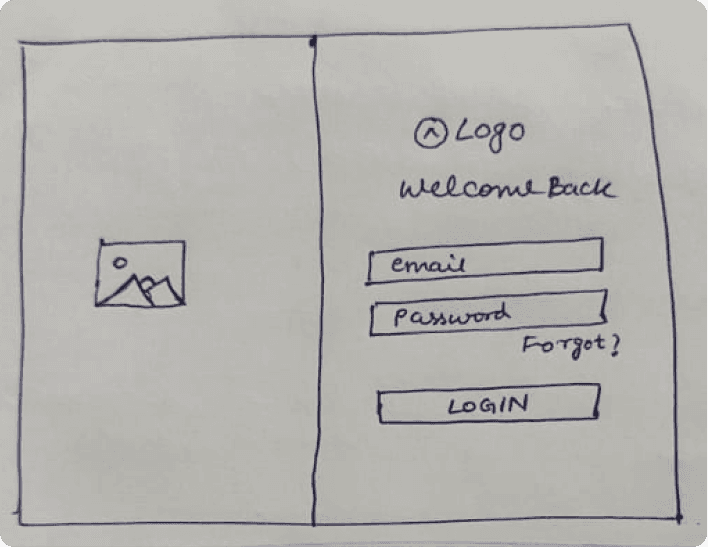
Idea 1:
Login Screen
Based on the email ID/username and password
Idea 1:
Login Screen
Based on the email ID/username and password
Idea 2:
Login via phone number
Idea 2:
Login via phone number
Idea 3:
OTP verification for security
Idea 3:
OTP verification for security
Inventory Screen
Inventory Screen

Idea 1:
A scrollable list view of all products with filters for model, product and stock availability.
Idea 1:
A scrollable list view of all products with filters for model, product and stock availability.
Idea 2:
Card Layout for easy scanning as users can only scan 7 items at a time according to Miller’s Law
Idea 2:
Card Layout for easy scanning as users can only scan 7 items at a time according to Miller’s Law
Design + Prototype
Design + Prototype
a Design System was created…
a Design System was created…

but why was it needed?
but why was it needed?
It was important as it provided-
It was important as it provided-
1
1
Consistency across screens- Ensures dashboards, inventory views and order flows felt familiar
Consistency across screens- Ensures dashboards, inventory views and order flows felt familiar
2
2
Saves time during future iterations- Reusable components helped in faster design and development
Saves time during future iterations- Reusable components helped in faster design and development
3
3
Accuracy- Clear design guidelines minimized inconsistencies between design and implementation.
Accuracy- Clear design guidelines minimized inconsistencies between design and implementation.
4
4
Scalability for future features- Easier addition of new features without breaking existing experiences
Scalability for future features- Easier addition of new features without breaking existing experiences
Designing the Hi-Fi screens
Designing the Hi-Fi screens
Login Screen
Login Screen

Design decisions-
Clean, Distraction Free Login Flow
Right side focused on logging in with simple fields
forgot password for emergency
“Remember me” for convenience.
Design decisions-
Clean, Distraction Free Login Flow
Right side focused on logging in with simple fields
forgot password for emergency
“Remember me” for convenience.

Design decisions-
Security & data privacy
Added phone based OTP verification to
strengthen data security
keep the login process quick and easy for sales managers.
Design decisions-
Security & data privacy
Added phone based OTP verification to
strengthen data security
keep the login process quick and easy for sales managers.
Dashboard Screen
Dashboard Screen

Design decisions-
Sync Data Button
Added so users can quickly refresh and trust that they’re viewing the latest information.
Time Period dropdown
Added so users can quickly view insights for months or rangeRecent Orders
Users can quickly see the latest activity right on the dashboardBuy it again
Encourages habit based orderingRecently viewed
Making the experience feel personal
Design decisions-
Sync Data Button
Added so users can quickly refresh and trust that they’re viewing the latest information.
Time Period dropdown
Added so users can quickly view insights for months or rangeRecent Orders
Users can quickly see the latest activity right on the dashboardBuy it again
Encourages habit based orderingRecently viewed
Making the experience feel personal
Inventory Screen
Inventory Screen

Design decisions-
Categorized Inventory
Helps users quickly navigate their product type, reducing cognitive overload.
Visual Sub Category Cards
Makes it easy to scan. Perfect for retail environments where names alone may not be enough.
Design decisions-
Categorized Inventory
Helps users quickly navigate their product type, reducing cognitive overload.
Visual Sub Category Cards
Makes it easy to scan. Perfect for retail environments where names alone may not be enough.

Design decisions-
Visual Product Cards
Makes it easy to scan and identify products visually.
Real-Time Stock Visibility
Helps users instantly identify stock availability, allowing faster decision making without opening each item.
Design decisions-
Visual Product Cards
Makes it easy to scan and identify products visually.
Real-Time Stock Visibility
Helps users instantly identify stock availability, allowing faster decision making without opening each item.
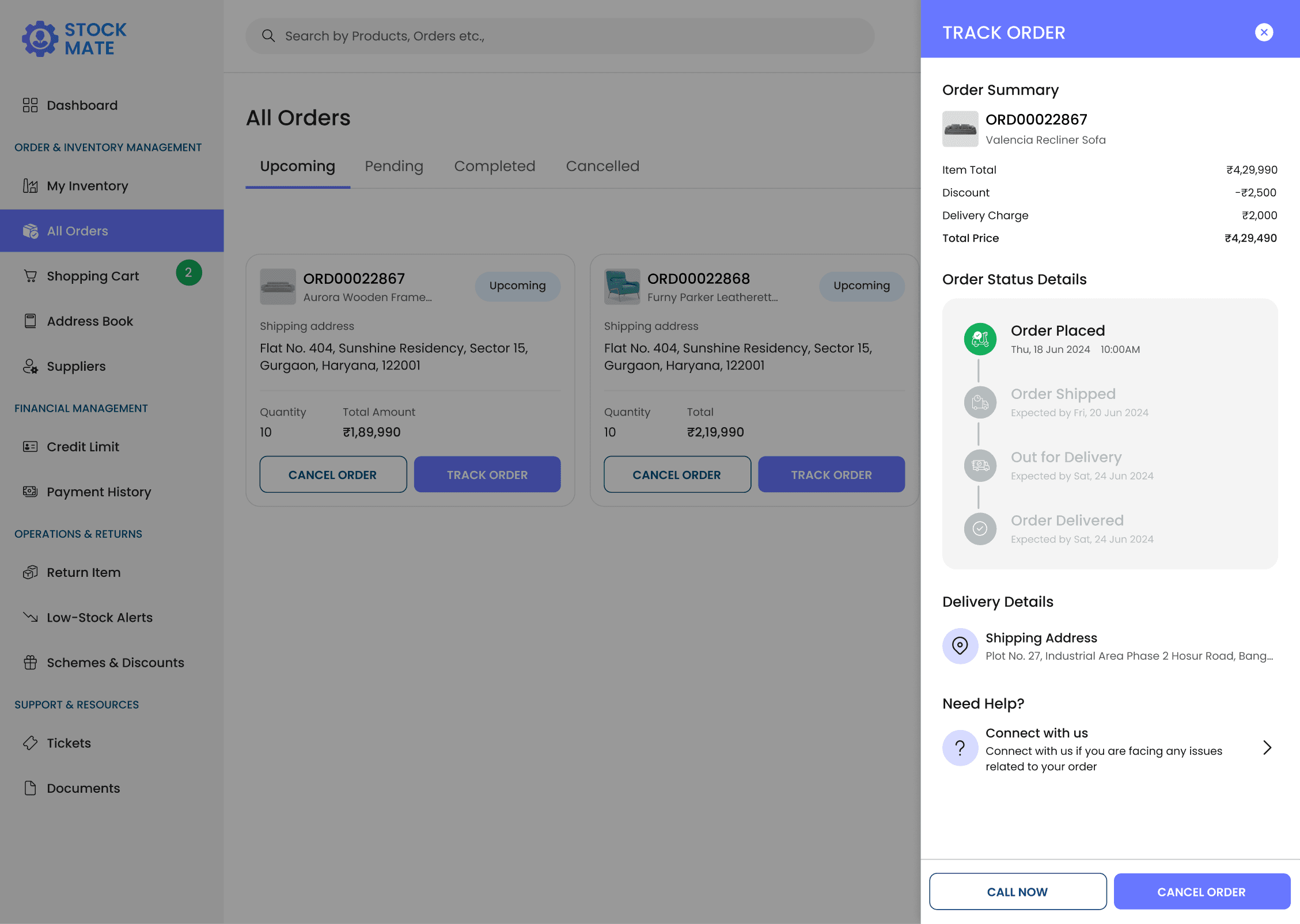
Order Details Screen
Order Details Screen

Design decisions-
Cancel & Call Now CTA
Helps in quick decision making and saves time.Detailed Order Tracking
Transparent timeline of the order status showing expected delivery dates which helps in predictability.
Design decisions-
Cancel & Call Now CTA
Helps in quick decision making and saves time.Detailed Order Tracking
Transparent timeline of the order status showing expected delivery dates which helps in predictability.
Documents Screen
Documents Screen

Design decisions-
Detailed Centralized documentation
Users can easily access PDFs to stay informed, ensure safety and build trust.
Design decisions-
Detailed Centralized documentation
Users can easily access PDFs to stay informed, ensure safety and build trust.
UX Importance-
Why it was needed?
Centralized access to all important documents
Quick reference for policies and guides
Ensures compliance and safety
Builds trust with clear Terms & Privacy
UX Importance-
Why it was needed?
Centralized access to all important documents
Quick reference for policies and guides
Ensures compliance and safety
Builds trust with clear Terms & Privacy
Usability Testing
Usability Testing
Defining the tasks for the users
Defining the tasks for the users
Log in using email, password and OTP verification.
Log in using email, password and OTP verification.
Navigate to the dashboard and identify key insights like total orders, most recent purchase and total revenue.
Navigate to the dashboard and identify key insights like total orders, most recent purchase and total revenue.
Refresh data using the “Sync Data” button and confirm updates.
Refresh data using the “Sync Data” button and confirm updates.
Filter dashboard data by a last 6 months
Filter dashboard data by a last 6 months
Go to the inventory section and locate a specific product.
Go to the inventory section and locate a specific product.
Add a low-stock product to the cart and proceed with order placement.
Add a low-stock product to the cart and proceed with order placement.
View order confirmation or error screen after placing an order.
View order confirmation or error screen after placing an order.
Access the Active Orders page and open a recent order to view delivery details.
Access the Active Orders page and open a recent order to view delivery details.
Things to observe
Things to observe
Task Success
Task Success
Can the user complete the task without help?
Can the user complete the task without help?
Time taken to complete tasks.
Time taken to complete tasks.
Number of errors or retries.
Number of errors or retries.
Understanding & Clarity
Understanding & Clarity
Comprehension of dashboard metrics and alerts.
Comprehension of dashboard metrics and alerts.
Interpretation of product status, orders and notifications.
Interpretation of product status, orders and notifications.
Clarity of labels, icons and terminology.
Clarity of labels, icons and terminology.
Navigation & Interaction
Navigation & Interaction
Ease of finding sections and buttons.
Ease of finding sections and buttons.
Ability to interact with drop downs, tables and cards.
Ability to interact with drop downs, tables and cards.
Smoothness of workflow between screens.
Smoothness of workflow between screens.
Feedback & Trust
Feedback & Trust
User’s frustration or confusion during tasks.
User’s frustration or confusion during tasks.
Recognition of confirmation/
error messages.
Recognition of confirmation/
error messages.
Confidence and trust in the system’s data and actions.
Confidence and trust in the system’s data and actions.
Testing the prototype with users
Testing the prototype with users
Due to lack of budget and availability, we could only test the prototype with the internal team, developers, QA and Operations.
Due to lack of budget and availability, we could only test the prototype with the internal team, developers, QA and Operations.
Observation and Feedback notes
Observation and Feedback notes
User 1 - Internal member
User found the dashboard giving a quick overview
User found the dashboard giving a quick overview
User had to look twice to find the low-stock products at first
User had to look twice to find the low-stock products at first
Time period filters were helpful
Time period filters were helpful
Sync Data button reassures me that I’m seeing the latest inventory.
Sync Data button reassures me that I’m seeing the latest inventory.
User 2 - Developer
Developer found components were reusable and easy to implement
Developer found components were reusable and easy to implement
OTPs via phone are straightforward
OTPs via phone are straightforward
Inventory interactions are smooth to implement
Inventory interactions are smooth to implement
Order details on a full screen will take extra development effort
Order details on a full screen will take extra development effort
User 3 - QA
QA pointed out a few missing edge cases
QA pointed out a few missing edge cases
QA was able to navigate through the portal, from viewing products to placing an order
QA was able to navigate through the portal, from viewing products to placing an order
QA found inventory alerts highlight low-stock items clearly
QA found inventory alerts highlight low-stock items clearly
Error messages and validation were clear
Error messages and validation were clear
User 4 - Operations
Dashboard helped operations team to see the critical metrics at a glance
Dashboard helped operations team to see the critical metrics at a glance
Custom built solution felt aligned to our workflows
Custom built solution felt aligned to our workflows
Order tracking gave a better visibility and reduce follow-ups with the team.
Order tracking gave a better visibility and reduce follow-ups with the team.
Operations team felt confident with the portal’s UI and the user flows
Operations team felt confident with the portal’s UI and the user flows
Design + Prototype
Design + Prototype
Implementing the UI changes based on the above feedback
Implementing the UI changes based on the above feedback
Dashboard Screen
Dashboard Screen

Change made-
Low stock number visibility
As low stock is an important decision making factor, this number will allow sales managers act proactively rather than reactively.
Change made-
Low stock number visibility
As low stock is an important decision making factor, this number will allow sales managers act proactively rather than reactively.
Order Details Screen
Order Details Screen

Change made-
Sliding pop-up screen
This allows users to view order details without leaving the current page and prevents clutter.
Takes less space so user's eye is focused
Saves development effort of developers
Change made-
Sliding pop-up screen
This allows users to view order details without leaving the current page and prevents clutter.
Takes less space so user's eye is focused
Saves development effort of developers
Developer hand-off
Developer hand-off
Developer hand-off
Developer hand-off
1
1
Handed off designs with clear specifications and reusable components
Handed off designs with clear specifications and reusable components
2
2
Documented key interactions and edge cases on Figma
Documented key interactions and edge cases on Figma
3
3
Provided all the empty states and error states designs
Provided all the empty states and error states designs
4
4
Explained the entire flow with the help of Figma prototype to developer and QA
Explained the entire flow with the help of Figma prototype to developer and QA
How did the solution benefit the business?
How did the solution benefit the business?
Reduced manual effort by 70%, freeing the team to focus on higher value work.
Reduced manual effort by 70%, freeing the team to focus on higher value work.
Improved inventory accuracy by 35%, reducing errors and missed orders.
Improved inventory accuracy by 35%, reducing errors and missed orders.
Dashboards helped to make quick, informed decisions about orders, restocking and popular products.
Dashboards helped to make quick, informed decisions about orders, restocking and popular products.
Increased trust and reliability as business can now rely on the portal for accurate data.
Increased trust and reliability as business can now rely on the portal for accurate data.
My learnings
My learnings
1
1
Understanding real workflows matters– Observing how sales managers actually work revealed pain points which spreadsheets alone couldn’t show.
Understanding real workflows matters– Observing how sales managers actually work revealed pain points which spreadsheets alone couldn’t show.
2
2
Custom solutions require careful balance– Designing a portal that’s secure, connected to Salesforce and easy to use taught me the importance of aligning UX with backend capabilities.
Custom solutions require careful balance– Designing a portal that’s secure, connected to Salesforce and easy to use taught me the importance of aligning UX with backend capabilities.
3
3
Design systems saves time– Reusable components made the design process faster and ensured consistency across screens.
Design systems saves time– Reusable components made the design process faster and ensured consistency across screens.
4
4
Data visualization is powerful– Clear dashboards improved decision-making for users.
Data visualization is powerful– Clear dashboards improved decision-making for users.
5
5
Collaboration with cross-functional teams is the key– Feedback from developers, QA and client highlighted the importance of iteration, testing and communication in building a practical solution.
Collaboration with cross-functional teams is the key– Feedback from developers, QA and client highlighted the importance of iteration, testing and communication in building a practical solution.
Inventory and Order Management solution for a B2B company
Time:
4 months (2024)
Industry:
Retail (B2B)
Team:
UI Designer, PM, Developers, Client and Operations
Platform:
Desktop
My role:
Lead UX Designer -> Responsible for research, design, user flows, information architecture, design system, coordinating with operations and developer
Please Note- This case study focuses on my UX process and outcomes at a high level. Specific internal details and sensitive business information have been deliberately omitted or generalized to respect client confidentiality.
Project Overview
A custom web based Inventory & Order Management system for a growing retail business, built to centralize orders and track inventory more easily. It simplifies workflows, cuts manual effort by around 70%, improves inventory accuracy by 35% and gives real time visibility, helping the business scale while reducing errors.
20+
Components
30+
Figma Frames
5+
User Flows
Problem
The client relied on spreadsheets and manual tracking, which became inefficient as the business grew. Without a centralized system, order status, inventory accuracy and operational visibility were poor, leading to errors, delays, missed orders and ultimately impacting revenue and growth.
Solution
I designed a centralized order and inventory management system from scratch, cutting manual work by 70% and improving inventory accuracy by 35%. With real time visibility and clear workflows, it reduced errors and speeded up operations.
Estimated Outcomes
35%
Improved Inventory Accuracy
75%
Reduction in Mental Effort
60%
Increase in Decision Making Speed
Constraints
1
User specific- Tailored only to the sales managers
2
Limited digital literacy- Some users may not be tech-savvy, so the UI must be intuitive and simple.
3
Data synchronization- Inventory and orders should update in real-time.
4
Security & data privacy- Sensitive order and inventory data must be protected.
5
Feature prioritization- Must focus on core needs first before adding extra features like analytics dashboards.
My approach

Understanding needs
Understanding the "Project Requirements"
The project began with a clear business need -> required a custom structured system to track orders and inventory effectively as the business scaled. There was no existing software in place and operations relied heavily on spreadsheets, messages and manual coordination.
My first focus was not the interface, but understanding the operational pain caused by the absence of a system. The goal was to define:
"What must be tracked?"
"Who needs visibility into what?"
"What have we tried before? Why it didn’t work?"
Why the problem matters?
When orders and inventory are tracked manually, even small mistakes can lead to missed orders, stock issues and delayed deliveries. These inefficiencies lead to lost revenue, delayed deliveries and poor customer satisfaction.
Why a custom solution was needed?
A custom solution was needed because
Existing tools were too complex and expensive
Existing too did not match business's day-to-day workflow
Business required a system tailored to their specific needs
Business wanted to focus on visibility rather than generic features
The portal was required as a frontend experience for sales managers, connected to a robust backend data system like Salesforce for accurate and scalable data handling.
Gap in the market
Most existing tools are either too complex for small teams or too basic to scale with growth. They often don’t match real workflows, lack clear visibility and come with a steep learning curve. This solution fills that gap by being simple, workflow driven and built for growing businesses.
Research
Understanding the operations
Since there was no previous system or usage data, the research focused on how work actually happened.
I used these methods to understand more.
1
Stakeholder interviews with the business owner and operations team to understand order volume, fulfillment flow and decision making.
2
Workflow walkthroughs by mapping how an order moved from request to delivery using existing tools.
Key challenges identified
Inventory levels weren’t visible, making stock status unclear.
Order volumes weren’t easily tracked, requiring manual checks.
Popular or frequently ordered products were hard to identify.
Trends in stock were unclear, so reordering relied on experience, not data.
Analyzing the existing tools
We did a comparative analysis of existing inventory and order management tools to understand what they were offering.
Tool name
Zoho Inventory
Ordoro
Fishbowl Inventory
Who it’s for?
Small & medium businesses
Online sellers
Growing businesses
What it helps with?
Tracking stock and orders across channels
Managing online orders and shipping
Detailed inventory and warehouse management
What works well?
Affordable and easy to get started
Good for multi-channel order handling
Strong control over stock
Where it falls short?
Reports and dashboards are limited for quick insights
Expensive and not very intuitive for small teams
Desktop focused and costly for smaller teams
Key takeaways
Many tools are built for large businesses and are hard for small teams to use or afford.
Some tools handle basic stock tracking but don’t support end-to-end order management.
Even with integrations, teams struggle to get a real-time view of orders and inventory.
Most tools don’t reflect how small retailers actually work
Ideation
Organizing the information
With a clearer understanding of the workflow, I moved into ideation by thinking less about features and more about information flow. I explored different ways orders, inventory and status could connect to each other.
I asked questions like:
"What does the user need to see first when they open the system?"
"How can order status reduce follow-ups instead of creating more work?"
"What have we tried before? Why it didn’t work?"
Information Architecture
Defining user flows
Leveraged AI for visual guidance
AI Tool used - Lovable.Ai
Wireframes
Login Screen
Idea 1:
Login Screen
Based on the email ID/username and password
Idea 2:
Login via phone number
Idea 3:
OTP verification for security
Inventory Screen
Idea 1:
A scrollable list view of all products with filters for model, product and stock availability.
Idea 2:
Card Layout for easy scanning as users can only scan 7 items at a time according to Miller’s Law
Design + Prototype
a Design System was created…
but why was it needed?
It was important as it provided-
1
Consistency across screens- Ensures dashboards, inventory views and order flows felt familiar
2
Saves time during future iterations- Reusable components helped in faster design and development
3
Accuracy- Clear design guidelines minimized inconsistencies between design and implementation.
4
Scalability for future features- Easier addition of new features without breaking existing experiences
Designing the Hi-Fi screens
Login Screen
Design decisions-
Clean, Distraction Free Login Flow
Right side focused on logging in with simple fields
forgot password for emergency
“Remember me” for convenience.
Design decisions-
Security & data privacy
Added phone based OTP verification to
strengthen data security
keep the login process quick and easy for sales managers.
Dashboard Screen
Design decisions-
Sync Data Button
Added so users can quickly refresh and trust that they’re viewing the latest information.
Time Period dropdown
Added so users can quickly view insights for months or rangeRecent Orders
Users can quickly see the latest activity right on the dashboardBuy it again
Encourages habit based orderingRecently viewed
Making the experience feel personal
Inventory Screen
Design decisions-
Categorized Inventory
Helps users quickly navigate their product type, reducing cognitive overload.
Visual Sub Category Cards
Makes it easy to scan. Perfect for retail environments where names alone may not be enough.
Design decisions-
Visual Product Cards
Makes it easy to scan and identify products visually.
Real-Time Stock Visibility
Helps users instantly identify stock availability, allowing faster decision making without opening each item.
Order Details Screen
Design decisions-
Cancel & Call Now CTA
Helps in quick decision making and saves time.Detailed Order Tracking
Transparent timeline of the order status showing expected delivery dates which helps in predictability.
Documents Screen
Design decisions-
Detailed Centralized documentation
Users can easily access PDFs to stay informed, ensure safety and build trust.
UX Importance-
Why it was needed?
Centralized access to all important documents
Quick reference for policies and guides
Ensures compliance and safety
Builds trust with clear Terms & Privacy
Usability Testing
Defining the tasks for the users
Log in using email, password and OTP verification.
Navigate to the dashboard and identify key insights like total orders, most recent purchase and total revenue.
Refresh data using the “Sync Data” button and confirm updates.
Filter dashboard data by a last 6 months
Go to the inventory section and locate a specific product.
Add a low-stock product to the cart and proceed with order placement.
View order confirmation or error screen after placing an order.
Access the Active Orders page and open a recent order to view delivery details.
Things to observe
Task Success
Can the user complete the task without help?
Time taken to complete tasks.
Number of errors or retries.
Understanding & Clarity
Comprehension of dashboard metrics and alerts.
Interpretation of product status, orders and notifications.
Clarity of labels, icons and terminology.
Navigation & Interaction
Ease of finding sections and buttons.
Ability to interact with drop downs, tables and cards.
Smoothness of workflow between screens.
Feedback & Trust
User’s frustration or confusion during tasks.
Recognition of confirmation/
error messages.
Confidence and trust in the system’s data and actions.
Testing the prototype with users
Due to lack of budget and availability, we could only test the prototype with the internal team, developers, QA and Operations.
Observation and Feedback notes
User 1 - Internal member
User found the dashboard giving a quick overview
User had to look twice to find the low-stock products at first
Time period filters were helpful
Sync Data button reassures me that I’m seeing the latest inventory.
User 2 - Developer
Developer found components were reusable and easy to implement
OTPs via phone are straightforward
Inventory interactions are smooth to implement
Order details on a full screen will take extra development effort
User 3 - QA
QA pointed out a few missing edge cases
QA was able to navigate through the portal, from viewing products to placing an order
QA found inventory alerts highlight low-stock items clearly
Error messages and validation were clear
User 4 - Operations
Dashboard helped operations team to see the critical metrics at a glance
Custom built solution felt aligned to our workflows
Order tracking gave a better visibility and reduce follow-ups with the team.
Operations team felt confident with the portal’s UI and the user flows
Design + Prototype
Implementing the UI changes based on the above feedback
Dashboard Screen
Change made-
Low stock number visibility
As low stock is an important decision making factor, this number will allow sales managers act proactively rather than reactively.
Order Details Screen
Change made-
Sliding pop-up screen
This allows users to view order details without leaving the current page and prevents clutter.
Takes less space so user's eye is focused
Saves development effort of developers
Developer hand-off
Developer hand-off
1
Handed off designs with clear specifications and reusable components
2
Documented key interactions and edge cases on Figma
3
Provided all the empty states and error states designs
4
Explained the entire flow with the help of Figma prototype to developer and QA
How did the solution benefit the business?
Reduced manual effort by 70%, freeing the team to focus on higher value work.
Improved inventory accuracy by 35%, reducing errors and missed orders.
Dashboards helped to make quick, informed decisions about orders, restocking and popular products.
Increased trust and reliability as business can now rely on the portal for accurate data.
My learnings
1
Understanding real workflows matters– Observing how sales managers actually work revealed pain points which spreadsheets alone couldn’t show.
2
Custom solutions require careful balance– Designing a portal that’s secure, connected to Salesforce and easy to use taught me the importance of aligning UX with backend capabilities.
3
Design systems saves time– Reusable components made the design process faster and ensured consistency across screens.
4
Data visualization is powerful– Clear dashboards improved decision-making for users.
5
Collaboration with cross-functional teams is the key– Feedback from developers, QA and client highlighted the importance of iteration, testing and communication in building a practical solution.