I'm currently available for new work. Let me know if you're looking for a user experience designer. Let’s talk about the next big thing!
I'm currently available for new work. Let me know if you're looking for a user experience designer. Let’s talk about the next big thing!
I'm currently available for new work. Let me know if you're looking for a user experience designer. Let’s talk about the next big thing!
Redesigning e-commerce app to improve user engagement
Redesigning e-commerce app to improve user engagement
Time:
Time:
2024 - 2025
2024 - 2025
Industry:
Industry:
E-commerce
E-commerce
Team:
Team:
UI Designer, PM, Developers, QA
UI Designer, PM, Developers, QA
Platform:
Platform:
Mobile
Mobile
My role:
My role:
Lead UX Designer -> Responsible for identifying gaps, research, design, usability testing, accessibility, design system, coordinating with the client and developer
Lead UX Designer -> Responsible for identifying gaps, research, design, usability testing, accessibility, design system, coordinating with the client and developer

Please Note- This case study presents a high level overview of my design process. Sensitive details have been blurred to maintain client confidentiality. All assets and product visuals remain the property of their respective owners and are shown here solely for illustrative portfolio purposes.
Project Overview
Project Overview
Redesigned a Beverage Delivery mobile app to simplify ordering and subscriptions. The goal was to improve the overall user experience by streamlining the ordering process, simplifying subscriptions and increase in the number of orders placed by users while ensuring the experience felt trustworthy, intuitive and easy to use for everyday customers.
Redesigned a Beverage Delivery mobile app to simplify ordering and subscriptions. The goal was to improve the overall user experience by streamlining the ordering process, simplifying subscriptions and increase in the number of orders placed by users while ensuring the experience felt trustworthy, intuitive and easy to use for everyday customers.
40+
40+
Components
Components
800+
800+
Figma Frames
Figma Frames
5+
5+
New Features
New Features
Problem
Problem
The existing app was functional but was facing lower user satisfaction and operational efficiency and was receiving constant negative feedback. Users struggled with usability issues, poor navigation, inefficient order tracking and challenging order management, which led to hesitation and drop-offs and directly impacting conversions and revenue for the business.
The existing app was functional but was facing lower user satisfaction and operational efficiency and was receiving constant negative feedback. Users struggled with usability issues, poor navigation, inefficient order tracking and challenging order management, which led to hesitation and drop-offs and directly impacting conversions and revenue for the business.
Solution
Solution
Redesigned the app around clarity, predictability and accessibility, to ensure that users always know where they are in the journey. Simplified the ordering and subscription flows, improved checkout and navigation and added clear order tracking to make it more intuitive and more reliable for the users.
Redesigned the app around clarity, predictability and accessibility, to ensure that users always know where they are in the journey. Simplified the ordering and subscription flows, improved checkout and navigation and added clear order tracking to make it more intuitive and more reliable for the users.



Estimated Outcomes
Estimated Outcomes
20%
20%
Reduction in drop-offs
Reduction in drop-offs
12%
12%
Increase in orders placed
Increase in orders placed
10%
10%
Increase in subscription orders
Increase in subscription orders
Constraints
Constraints
1
1
Fixed delivery zones and service areas
Fixed delivery zones and service areas
2
2
Wallet-only payment requirement for placing all orders
Wallet-only payment requirement for placing all orders
3
3
Limited control over delivery timelines
Limited control over delivery timelines
4
4
Must meet WCAG accessibility standards
Must meet WCAG accessibility standards
5
5
Tight development timelines
Tight development timelines
My approach
My approach

Understanding needs
Understanding needs
Understanding the "Project Requirements"
Understanding the "Project Requirements"
I started by speaking with key stakeholders to align on the project requirements including business goals and user pain points.
I started by speaking with key stakeholders to align on the project requirements including business goals and user pain points.
My first focus was not the interface, but understanding the core challenges. The goal was to define:
My first focus was not the interface, but understanding the core challenges. The goal was to define:
"Why redesign?"
"Why redesign?"
"What loss is the business facing?"
"What loss is the business facing?"
"Where errors or delays typically occur?"
"Where errors or delays typically occur?"
Business goals
Business goals
1
1
Prioritize subscriptions and increase total number of orders placed
Prioritize subscriptions and increase total number of orders placed
2
2
Enable wallet-only payments
Enable wallet-only payments
3
3
Improve accessibility and WCAG compliance
Improve accessibility and WCAG compliance
4
4
Improve trust, predictability and clarity without breaking familiarity
Improve trust, predictability and clarity without breaking familiarity
User pain points
User pain points
1
1
Unsure when the order will be delivered
Unsure when the order will be delivered
2
2
Subscription order placement took longer time
Subscription order placement took longer time
3
3
Users were unsure where to start from once they land on the homepage
Users were unsure where to start from once they land on the homepage
4
4
Limited information while deciding
Limited information while deciding
But how was the user's pain points captured?
But how was the user's pain points captured?
With no formal research budget, I…
With no formal research budget, I…
Spoke with internal stakeholders from client’s team to get clarity on the user's pain points identified by them.
Spoke with internal stakeholders from client’s team to get clarity on the user's pain points identified by them.
Downloaded the app myself and went through the entire process, from registration and sign-up to placing orders, to experience the flow firsthand.
Downloaded the app myself and went through the entire process, from registration and sign-up to placing orders, to experience the flow firsthand.
Reviewed the feedbacks from openly accessible Google Play Store and the App Store, along with user reviews, to identify recurring issues and gaps.
Reviewed the feedbacks from openly accessible Google Play Store and the App Store, along with user reviews, to identify recurring issues and gaps.
Audit
Audit
Analyzing the existing app
Analyzing the existing app
Before redesigning, it was important to understand what was breaking and why.
Before redesigning, it was important to understand what was breaking and why.
I audited the existing app to identify-
I audited the existing app to identify-
1
1
Information overload on key screens
Information overload on key screens
2
2
Poor hierarchy and unclear CTAs
Poor hierarchy and unclear CTAs
3
3
Inconsistent patterns across flows
Inconsistent patterns across flows
Login Screen
Login Screen

1
5
2
3
4
1
5
2
3
4
Problems identified:
Unclear purpose: Users may be confused if the screen is for login or account creation.
Non-standard login: Mobile/Email ID + Password login slows down the process.
Primary action unclear: Login button doesn’t stand out.
Accessibility issues: Low contrast and small touch areas.
Redundant elements: Unnecessary back button at the top.
Problems identified:
Unclear purpose: Users may be confused if the screen is for login or account creation.
Non-standard login: Mobile/Email ID + Password login slows down the process.
Primary action unclear: Login button doesn’t stand out.
Accessibility issues: Low contrast and small touch areas.
Redundant elements: Unnecessary back button at the top.
Home Screen
Home Screen
1
2
4
3
1
2
4
3
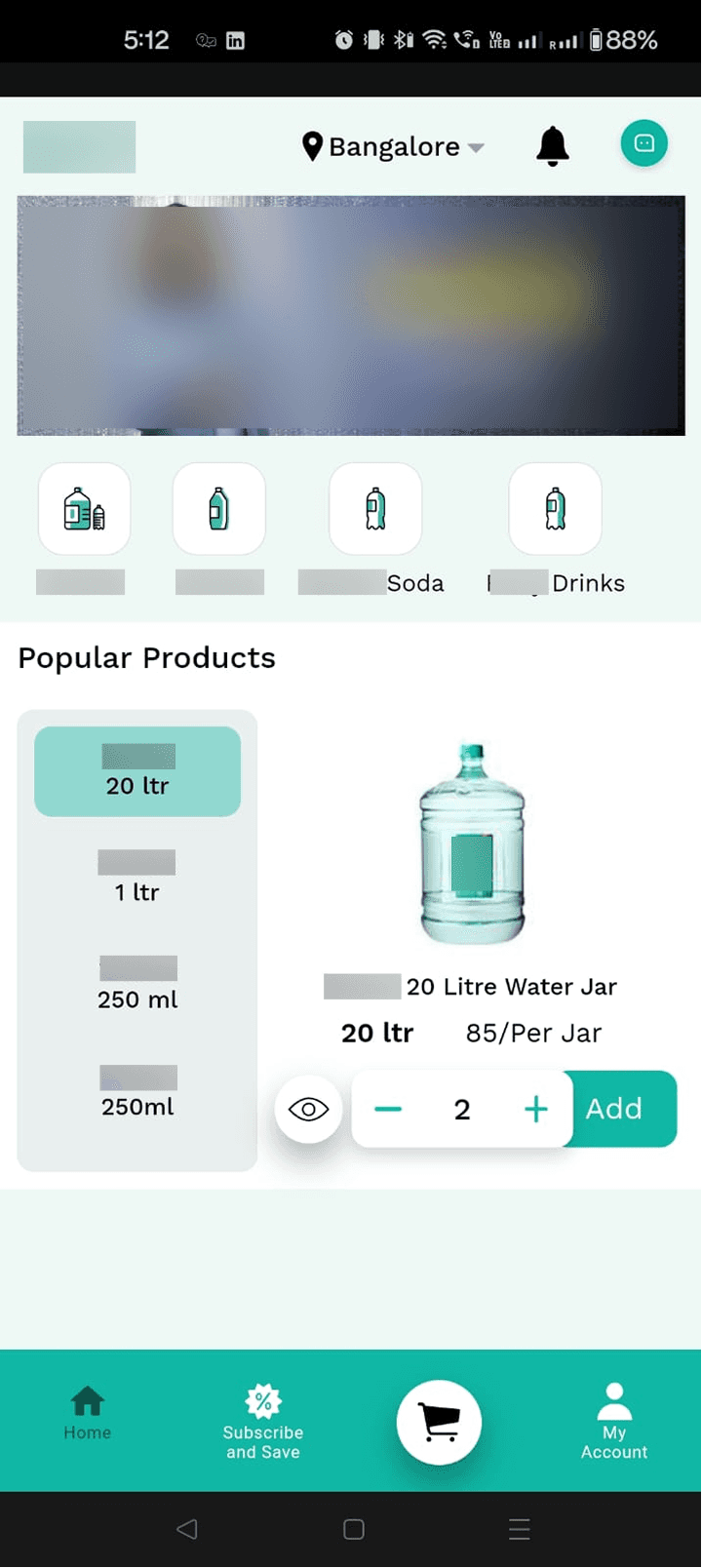
Problems identified:
Subscription goal unclear: Users may not understand the benefits or purpose of starting a subscription by looking at the first screen (Homepage).
Misleading cart icon: Highlighted as if selected, causing confusion.
Disconnected visuals: Product categories and popular products feel visually separate.
Poor scanability: Pricing and product names lack hierarchy, making it hard to read quickly.
Problems identified:
Subscription goal unclear: Users may not understand the benefits or purpose of starting a subscription by looking at the first screen (Homepage).
Misleading cart icon: Highlighted as if selected, causing confusion.
Disconnected visuals: Product categories and popular products feel visually separate.
Poor scanability: Pricing and product names lack hierarchy, making it hard to read quickly.
Key challenges identified
Key challenges identified
Users had to process very less information on several screens
Users had to process very less information on several screens
Subscription benefits were not clearly communicated/highlighted
Subscription benefits were not clearly communicated/highlighted
Order tracking lacked visibility and reassurance
Order tracking lacked visibility and reassurance
Users failed to prioritize task due to lack of structure and hierarchy
Users failed to prioritize task due to lack of structure and hierarchy
Research
Research
Learning design from existing products
Learning design from existing products
The goal was not to reinvent the wheel but to design something familiar so that the users did not waste time into understanding the system.
The goal was not to reinvent the wheel but to design something familiar so that the users did not waste time into understanding the system.

Bigbasket
Bigbasket
Observation:
Placing the search and product categories at the top for easy discoverability.
Observation:
Placing the search and product categories at the top for easy discoverability.
Heuristic principle:
Visibility of System Status
Heuristic principle:
Visibility of System Status
Observation:
Clearly indicates which card is being shown and also tell how many more card are there.
Observation:
Clearly indicates which card is being shown and also tell how many more card are there.
UX Law:
Jakob’s Law
UX Law:
Jakob’s Law
Reason:
Users spend most of their time on other sites. This means that users prefer your site to work the same way as all the other sites they already know.
Reason:
Users spend most of their time on other sites. This means that users prefer your site to work the same way as all the other sites they already know.
Zomato
Zomato
Swiggy
Swiggy


User psychology:
makes the experience feel personal and relatable
User psychology:
makes the experience feel personal and relatable
Using a conversational prompt makes the app feel personal, relatable, and encourages immediate engagement.
Using a conversational prompt makes the app feel personal, relatable, and encourages immediate engagement.
Provilac
Provilac

Observation:
Using tabs reduces the need for long vertical scrolling, helping users access content faster and stay motivated.
Observation:
Using tabs reduces the need for long vertical scrolling, helping users access content faster and stay motivated.
The do’s:
Similarly different sections/features from various apps were viewed and analyzed for inspiration.
The do’s:
Similarly different sections/features from various apps were viewed and analyzed for inspiration.
The above screenshots are taken by me from the live apps of Zomato, Swiggy, BigBasket, and Provolic for reference purpose only.
Ideation
Ideation
Asking the right questions
Asking the right questions
Clear question framing ensured design decisions to stay aligned with both user needs and business goals. This approach guided every design decision that followed.
Clear question framing ensured design decisions to stay aligned with both user needs and business goals. This approach guided every design decision that followed.
"Why is this an important problem?"
"Why is this an important problem?"
"What have we tried before? Why it didn’t work?"
"What have we tried before? Why it didn’t work?"
"What metrics does business track on a daily basis?"
"What metrics does business track on a daily basis?"
"How might we simplify complex flows without making the experience feel unfamiliar to existing users?"
"How might we simplify complex flows without making the experience feel unfamiliar to existing users?"
Thinking of possible solutions…
Thinking of possible solutions…
Login Screen
Login Screen
Idea 1:
Adding a welcome image at the top of the screen
Idea 1:
Adding a welcome image at the top of the screen
Idea 2:
Keep email only and password login options
Idea 2:
Keep email only and password login options
Idea 3:
Giving a heading to the screen like “Login” and a link at the bottom to sign up
Idea 3:
Giving a heading to the screen like “Login” and a link at the bottom to sign up
Idea 4:
Keeping the login via mobile only and OTP verification
Idea 4:
Keeping the login via mobile only and OTP verification
Idea 5:
Make social login options as a secondary option
Idea 5:
Make social login options as a secondary option
Idea 6:
Remove social login options
Idea 6:
Remove social login options
Home Screen
Home Screen
Idea 1:
Have a search field at the top for easy access of user
Idea 1:
Have a search field at the top for easy access of user
Idea 2:
Multiple auto scroll card for marketing purposes
Idea 2:
Multiple auto scroll card for marketing purposes
Idea 3:
Have a search icon at the top beside notification icon
Idea 3:
Have a search icon at the top beside notification icon
Idea 4:
Bottom nav bar → Home, Subscription, Wallet, Cart and Profile
Idea 4:
Bottom nav bar → Home, Subscription, Wallet, Cart and Profile
Idea 5:
Bottom nav bar → Home, Products, Subscription, Cart and Profile
Idea 5:
Bottom nav bar → Home, Products, Subscription, Cart and Profile
Idea 6:
New Features:
Hydration Reminder
Out for delivery card
Games
Idea 6:
New Features:
Hydration Reminder
Out for delivery card
Games
Idea 7:
Show cards to display information like-
Subscription motivation
Referrals
Shop by category
Festive offers
Idea 7:
Show cards to display information like-
Subscription motivation
Referrals
Shop by category
Festive offers
Wireframing and Visual Exploration
Wireframing and Visual Exploration
Leveraged AI to speed up visual exploration and validate layout decisions early in the design process.
Leveraged AI to speed up visual exploration and validate layout decisions early in the design process.
Lovable.Ai
Lovable.Ai

Claude.Ai
Claude.Ai

Figma Make
Figma Make

Prioritisation through phased releases
Prioritisation through phased releases
While ideating with the team, we decided early on that-
While ideating with the team, we decided early on that-
As this was a live app, business couldn’t pause operations while redesigning or developing. So instead of one large release, the project was split into four phases. Each phase introduced new improvements while keeping the app live.
As this was a live app, business couldn’t pause operations while redesigning or developing. So instead of one large release, the project was split into four phases. Each phase introduced new improvements while keeping the app live.
This approach:
This approach:
1
1
Helped prioritise the most impactful features first
Helped prioritise the most impactful features first
2
2
Reduced pressure on design and development teams
Reduced pressure on design and development teams
3
3
Gave developers time to adapt to new flows
Gave developers time to adapt to new flows
4
4
Ensured the business continued to run smoothly
Ensured the business continued to run smoothly
Design + Prototype
Design + Prototype
a Design System was created, but why was it needed?
a Design System was created, but why was it needed?
It was important as it provided-
It was important as it provided-
1
1
Consistency across phased releases- uniform UI across phased releases
Consistency across phased releases- uniform UI across phased releases
2
2
Faster iteration- Reusable components helped in faster design and development
Faster iteration- Reusable components helped in faster design and development
3
3
Accuracy- Clear design guidelines minimized inconsistencies between design and implementation.
Accuracy- Clear design guidelines minimized inconsistencies between design and implementation.
4
4
Scalability for future phases- Easier addition of new features without breaking existing experiences
Scalability for future phases- Easier addition of new features without breaking existing experiences
Designing the Hi-Fi screens
Designing the Hi-Fi screens
Login Screen
Login Screen

Design decisions-
Welcome image → Makes the screen inviting and friendly.
“Login” heading → Clearly communicates the purpose of the screen.
Kept phone number as the primary login → Reduces complexity for faster login.
Enlarged main CTA → Draws attention to the primary action.
Made social logins secondary → Avoids distraction from main flow.
Sign-up link at bottom → Helps new users easily create an account.
Design decisions-
Welcome image → Makes the screen inviting and friendly.
“Login” heading → Clearly communicates the purpose of the screen.
Kept phone number as the primary login → Reduces complexity for faster login.
Enlarged main CTA → Draws attention to the primary action.
Made social logins secondary → Avoids distraction from main flow.
Sign-up link at bottom → Helps new users easily create an account.
Home Screen
Home Screen

Accessibility -
Using icon fill for selected state of icons (suitable for color blind users)
Accessibility -
Using icon fill for selected state of icons (suitable for color blind users)
Design decision-
Added “Shop by Category” section → Large, clear cards make options easy to notice and tap
Design decision-
Added “Shop by Category” section → Large, clear cards make options easy to notice and tap
Design decision-
Introduced 2 games → Adds interactive elements to the app
Design decision-
Introduced 2 games → Adds interactive elements to the app
Design decision-
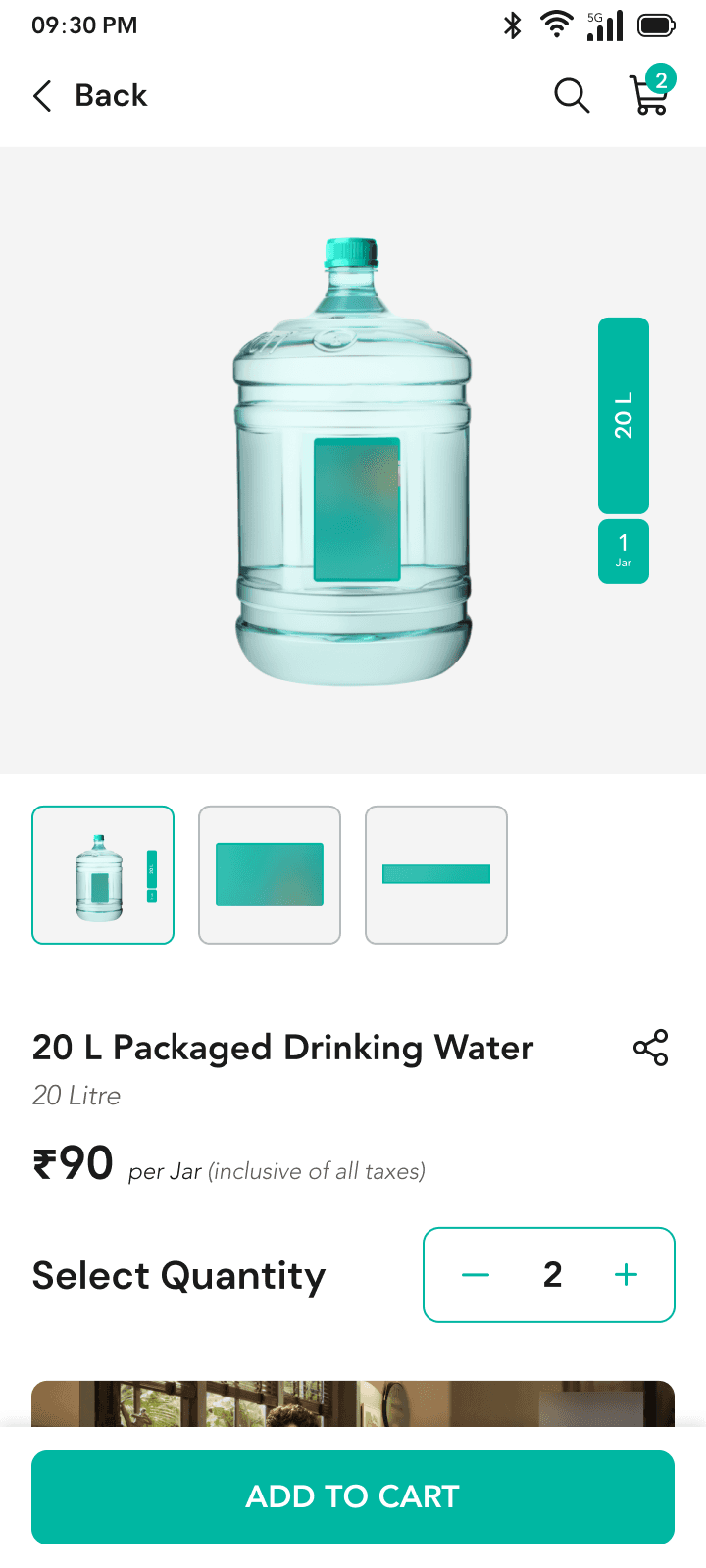
Redesigned “Most Popular Products” → Improved text hierarchy, clear prices and prominent CTA
Design decision-
Redesigned “Most Popular Products” → Improved text hierarchy, clear prices and prominent CTA
Design decisions-
Location displayed upfront → Mirrors familiar delivery apps, shows current delivery area
Search field with voice → Lets users find products faster
Brands at top + marketing banners → Highlights key brands and promotions
Subscription benefits card → Communicates value clearly
Design decisions-
Location displayed upfront → Mirrors familiar delivery apps, shows current delivery area
Search field with voice → Lets users find products faster
Brands at top + marketing banners → Highlights key brands and promotions
Subscription benefits card → Communicates value clearly
Design decision-
Upcoming Delivery card → Shows delivery status upfront
Design decision-
Upcoming Delivery card → Shows delivery status upfront
1
2
3
4
5
6
Search Screen
Search Screen
Accessibility -
Voice search for people having difficulty in typing
Accessibility -
Voice search for people having difficulty in typing
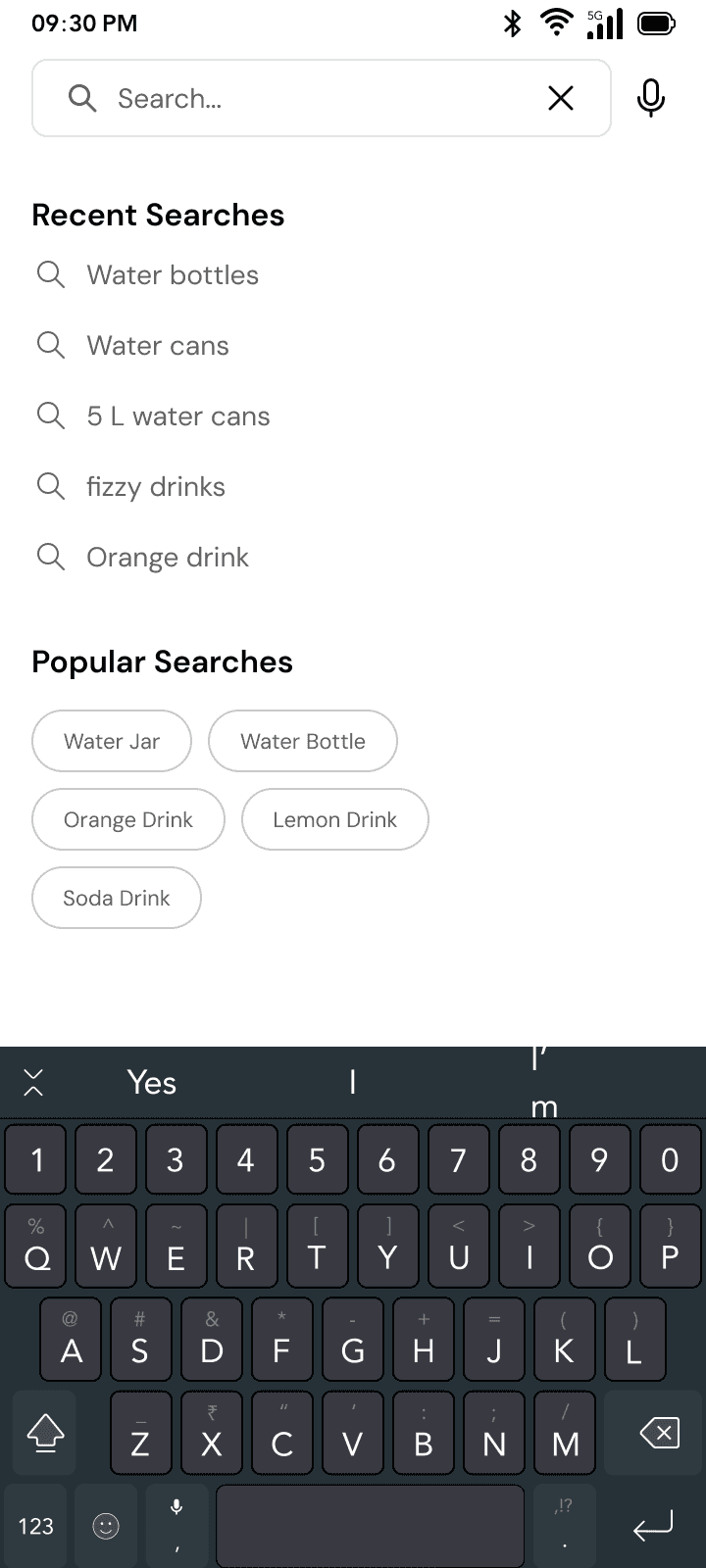
Design decisions -
Following Jacob Nielsen's 6th heuristic -> "Recognition rather than Recall", Shows recent & popular searches so users don’t have to remember.
Followed these laws to support the decision: Fitts’ Law → Tappable buttons are easy to hit.
Jakob’s Law → Users expect search suggestions.
Design decisions -
Following Jacob Nielsen's 6th heuristic -> "Recognition rather than Recall", Shows recent & popular searches so users don’t have to remember.
Followed these laws to support the decision: Fitts’ Law → Tappable buttons are easy to hit.
Jakob’s Law → Users expect search suggestions.
Profile Screen
Profile Screen
Design decisions -
Following Jacob Nielsen's 9th heuristic -> "Help users Recognize, Diagnose and Recover from Errors"
Action - Delete account
Reason - Not satisfied with the app
Recover - Prompts user to reconsider before deleting
Design decisions -
Following Jacob Nielsen's 9th heuristic -> "Help users Recognize, Diagnose and Recover from Errors"
Action - Delete account
Reason - Not satisfied with the app
Recover - Prompts user to reconsider before deleting
Cart Screen
Cart Screen
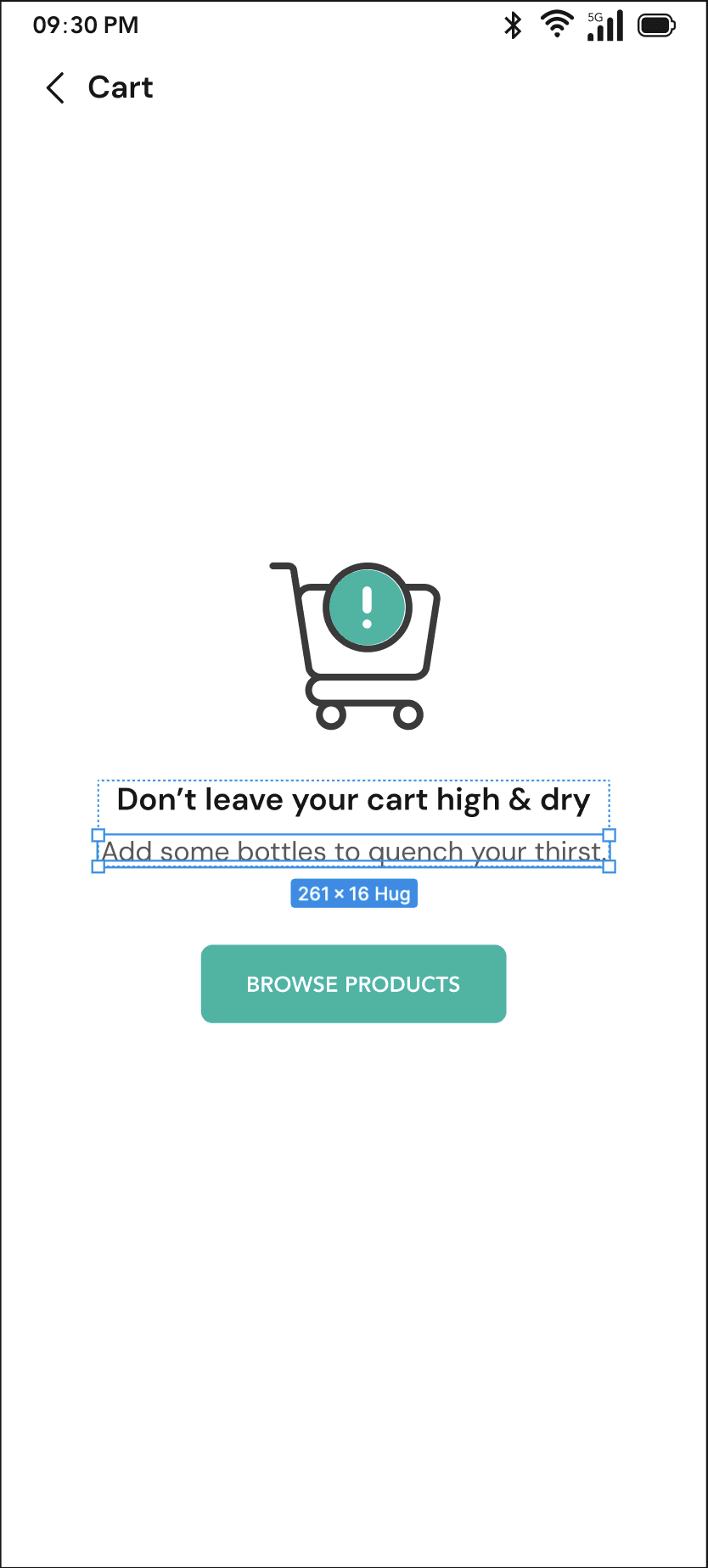

Design decisions -
Accessibility- Sufficient color contrast (Plugin used: Contrast)
Empty State + CTA → Shows user what’s happening and next steps.
Design decisions -
Accessibility- Sufficient color contrast (Plugin used: Contrast)
Empty State + CTA → Shows user what’s happening and next steps.
Accessible Design
Accessible Design
Designed for all users, ensuring ease of use and accessibility across abilities. Key Accessibility Features Implemented -
Designed for all users, ensuring ease of use and accessibility across abilities. Key Accessibility Features Implemented -
1
1
Visual States - Ensured buttons and inputs had clear visual states when active or disabled.
Visual States - Ensured buttons and inputs had clear visual states when active or disabled.
2
2
Touch targets - Designed buttons large enough with proper spacing to prevent accidental taps.
Touch targets - Designed buttons large enough with proper spacing to prevent accidental taps.
3
3
Alternate Actions - Provided simple tap based alternatives for actions like swipe or drag.
Alternate Actions - Provided simple tap based alternatives for actions like swipe or drag.
4
4
Clear Labels - Simple microcopy that explains actions and expectations.
Clear Labels - Simple microcopy that explains actions and expectations.
5
5
Error Guidance - Designed error cases that explain what went wrong and how to fix it.
Error Guidance - Designed error cases that explain what went wrong and how to fix it.
6
6
Recognition - Designed login flows that do not depend only on memory but on vision or fast input.
Recognition - Designed login flows that do not depend only on memory but on vision or fast input.
Usability Testing
Usability Testing
Defining the tasks for the users
Defining the tasks for the users
Sign up or log in using mobile number
Sign up or log in using mobile number
Browse product categories to find bottled water options.
Browse product categories to find bottled water options.
Search for a specific product using the search bar.
Search for a specific product using the search bar.
Add products to the cart for one-time purchase.
Add products to the cart for one-time purchase.
Start a subscription order and set delivery frequency.
Start a subscription order and set delivery frequency.
Go to all orders from home page
Go to all orders from home page
Place an order (either one time or subscription)
Place an order (either one time or subscription)
Track order status and view upcoming deliveries.
Track order status and view upcoming deliveries.
Things to observe
Things to observe
Navigation
Navigation
Can users find brand categories easily
Can users find brand categories easily
Is Search functionality intuitive
Is Search functionality intuitive
Access to cart details
Access to cart details
Moving between screens feels seamless
Moving between screens feels seamless
Feedback & Trust
Feedback & Trust
Confirmation after actions is clear
Confirmation after actions is clear
Error messages are helpful
Error messages are helpful
Delivery and payment info feels reliable
Delivery and payment info feels reliable
Users feel confident after completing tasks
Users feel confident after completing tasks
Actions & Interactions
Actions & Interactions
Primary actions are visible and tappable
Primary actions are visible and tappable
Able to add products to cart
Able to add products to cart
Placing a subscription order
Placing a subscription order
Placing orders feels straightforward
Placing orders feels straightforward
Visual & Cognitive Design
Visual & Cognitive Design
Key elements are easy to scan
Key elements are easy to scan
App matches all the brand guidelines
App matches all the brand guidelines
Touch targets are appropriately sized
Touch targets are appropriately sized
Flows reduce cognitive load
Flows reduce cognitive load
Testing the prototype with users
Testing the prototype with users
Due to lack of budget and availability, we could only test the prototype with the internal team, developers, QA and the client.
Due to lack of budget and availability, we could only test the prototype with the internal team, developers, QA and the client.
Observation and Feedback notes
Observation and Feedback notes
User 1 - Internal member
User was able to find the brand categories
User was able to find the brand categories
User found the sign up flow lengthy
User found the sign up flow lengthy
User was able to place a subscription order with clear understanding
User was able to place a subscription order with clear understanding
User was able to track order with detailed step information
User was able to track order with detailed step information
User 2 - Developer
Developer found components were reusable and easy to implement
Developer found components were reusable and easy to implement
Some animations required extra effort to code
Some animations required extra effort to code
Certain custom elements like the games required more development time
Certain custom elements like the games required more development time
Developer found 3 steps to place an order to be lengthy, suggested for 2
Developer found 3 steps to place an order to be lengthy, suggested for 2
User 3 - QA
QA pointed out a few missing edge cases
QA pointed out a few missing edge cases
QA was able to navigate through the app, from viewing products to placing an order
QA was able to navigate through the app, from viewing products to placing an order
Some touch targets were too small
Some touch targets were too small
QA pointed to minor inconsistencies in typography and calculations across screens
QA pointed to minor inconsistencies in typography and calculations across screens
Error messages and validation were clear
Error messages and validation were clear
User 4 - Client
Colors used in certain components were not according to brand guidelines
Colors used in certain components were not according to brand guidelines
Client found the sign up to be a long process, wanted more shorter
Client found the sign up to be a long process, wanted more shorter
Subscription and one-time order flow met business goals
Subscription and one-time order flow met business goals
Elements like the games and hydration reminder was not needed
Elements like the games and hydration reminder was not needed
Some visual elements were misaligned with marketing expectations
Some visual elements were misaligned with marketing expectations
Design + Prototype
Design + Prototype
Implementing the UI changes
Implementing the UI changes
Redesigned Screen
Redesigned Screen
Did not work
Not required
Terms and conditions missing
Did not work
Not required
Terms and conditions missing
Redesigned Screen after Testing
Redesigned Screen after Testing
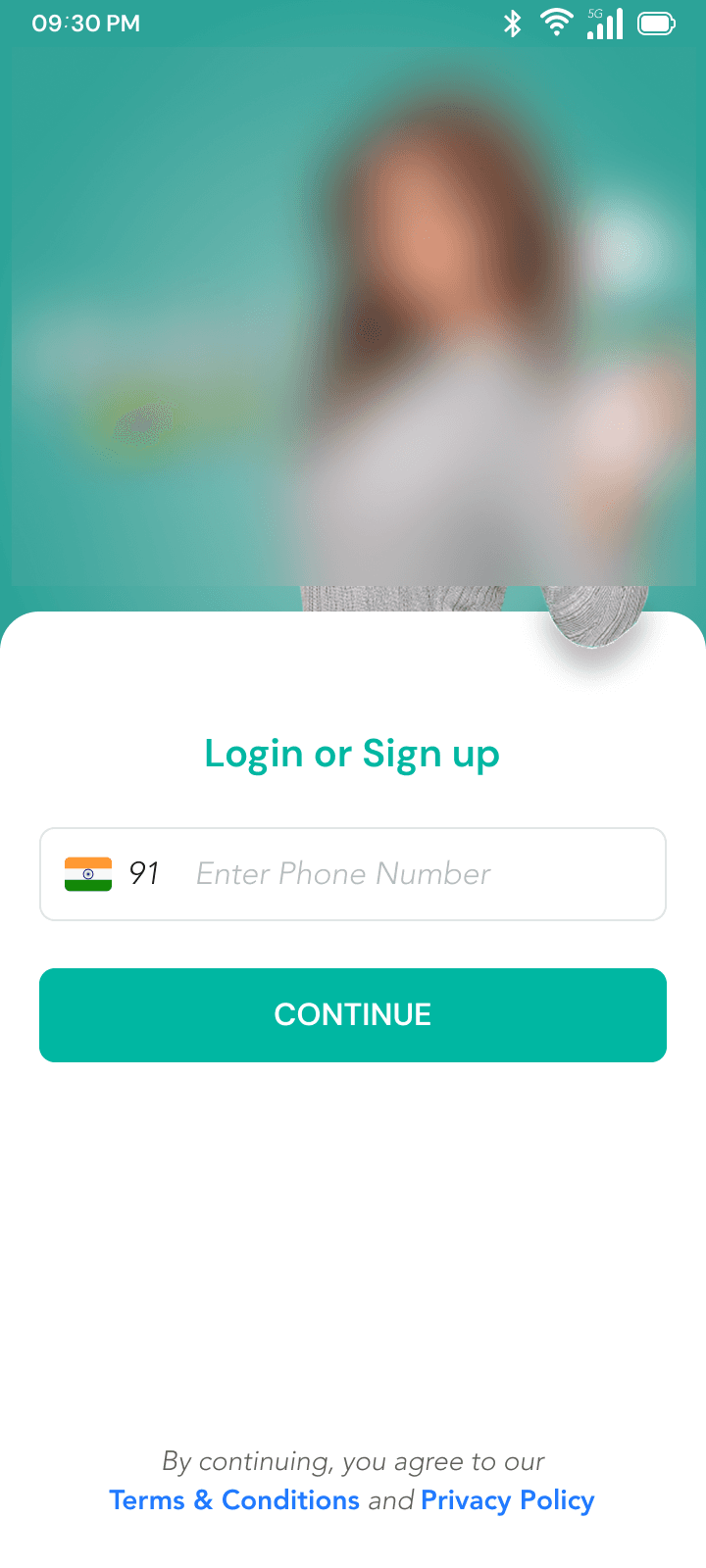
Changes made -
Redesigned the welcome image
Added a heading “Login or Sign-up”
Flow change-Based on their number. System will automatically predict which flow(login or sign up) to show
Added Terms & Conditions and Privacy Policy
Changes made -
Redesigned the welcome image
Added a heading “Login or Sign-up”
Flow change-Based on their number. System will automatically predict which flow(login or sign up) to show
Added Terms & Conditions and Privacy Policy
Redesigned Screen
Redesigned Screen
Did not work
Did not work
Color mismatch
Color mismatch
Did not work
Did not work
Not required
Not required
Needed priority
Needed priority
Redesigned Screen after Testing
Redesigned Screen after Testing

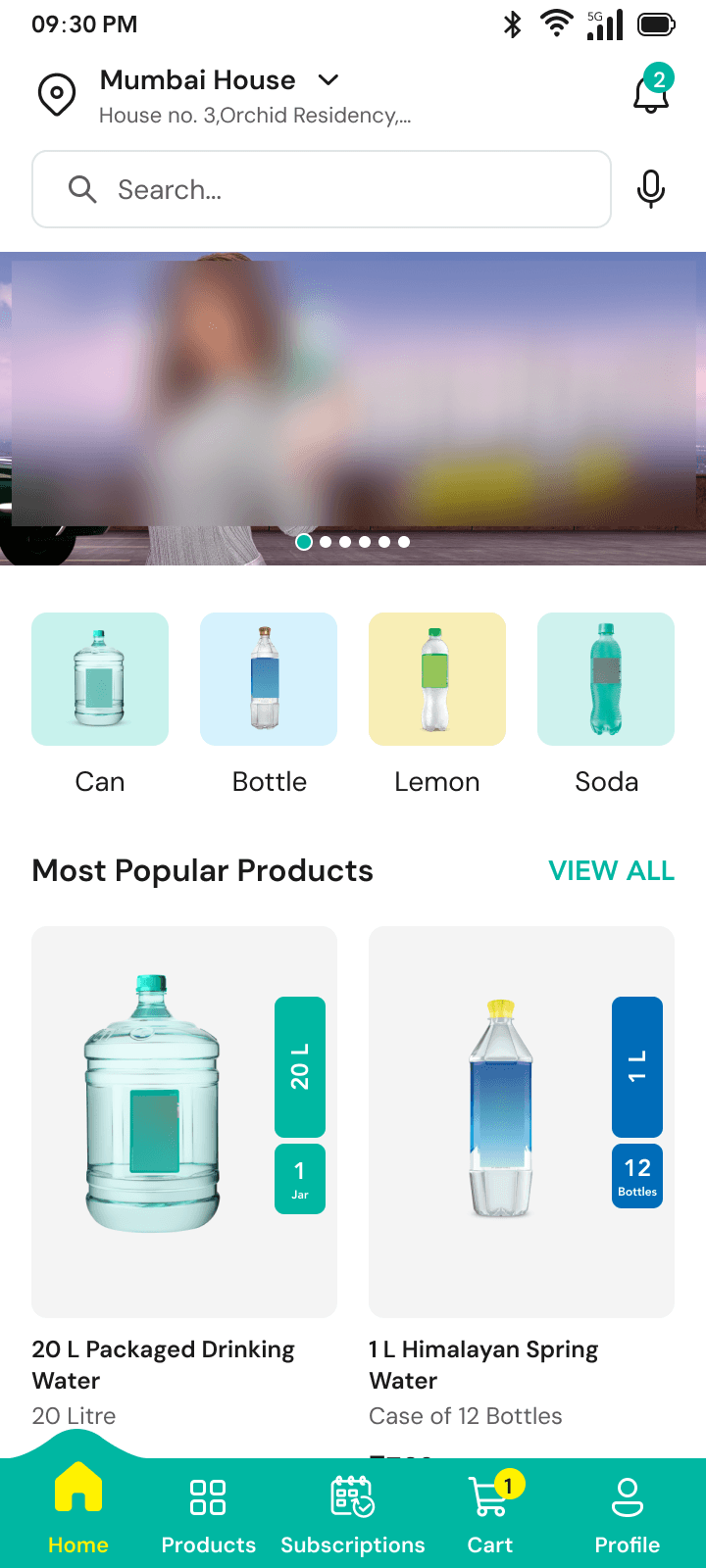
Change made -
Rearranged cards by user priority & business goals
Change made -
Rearranged cards by user priority & business goals
Changes made -
Added 2 address fields → Supports more detailed input
Auto scroll carousel → Highlights marketing campaigns
Brand colors & minimalism → Aligns look & feel with Bisleri
Product tags → Quick product info at a glance
“Subscribe” CTA on product cards → Promotes easy subscription
Redesigned “Out for Delivery” & subscription cards → Clear CTAs
Renamed “Shop by Category” → “Shop by Need” for relatability
Added referral card → Encourages sharing
Actionable card at bottom → Promotes other initiatives
Changes made -
Added 2 address fields → Supports more detailed input
Auto scroll carousel → Highlights marketing campaigns
Brand colors & minimalism → Aligns look & feel with Bisleri
Product tags → Quick product info at a glance
“Subscribe” CTA on product cards → Promotes easy subscription
Redesigned “Out for Delivery” & subscription cards → Clear CTAs
Renamed “Shop by Category” → “Shop by Need” for relatability
Added referral card → Encourages sharing
Actionable card at bottom → Promotes other initiatives
Developer hand-off
Developer hand-off
Developer hand-off
Developer hand-off
1
1
Handed off designs with clear specifications and reusable components
Handed off designs with clear specifications and reusable components
2
2
Documented key interactions and edge cases on Figma
Documented key interactions and edge cases on Figma
3
3
Provided all the empty states and error states designs
Provided all the empty states and error states designs
4
4
Explained the entire flow with the help of Figma prototype to developer and QA
Explained the entire flow with the help of Figma prototype to developer and QA
Beyond the hand-off
Beyond the hand-off
Design didn’t end with delivery. As development moved forward, new use cases emerged and the design team stayed involved to refine flows and support implementation.
Design didn’t end with delivery. As development moved forward, new use cases emerged and the design team stayed involved to refine flows and support implementation.
How did the redesign benefit the business?
How did the redesign benefit the business?
Reduced login drop-offs and increased account creation
Reduced login drop-offs and increased account creation
Boosted product and brand discovery
Boosted product and brand discovery
Increased engagement with promotional content
Increased engagement with promotional content
Increased conversion on high demand products
Increased conversion on high demand products
How did the redesign benefit the users?
How did the redesign benefit the users?
Users can now complete login faster without getting frustrated
Users can now complete login faster without getting frustrated
Users can find products faster via search and voice input
Users can find products faster via search and voice input
Users can now track their orders with clear
understanding
Users can now track their orders with clear
understanding
Users can add products at cart with less effort
Users can add products at cart with less effort
Proof that the redesign worked
Proof that the redesign worked
While the full business metrics remain confidential, the impact of the redesign was visible in several ways.
Images taken from openly accessible Google Play Store and the App Store.
While the full business metrics remain confidential, the impact of the redesign was visible in several ways.
Images taken from openly accessible Google Play Store and the App Store.

My learnings
My learnings
1
1
Laying a strong foundation of the design system early made design decisions faster and clearer.
Laying a strong foundation of the design system early made design decisions faster and clearer.
2
2
Phased releases taught me to focus on what truly matters at each stage instead of trying to do everything at once.
Phased releases taught me to focus on what truly matters at each stage instead of trying to do everything at once.
3
3
Working closely with developers and QA showed me that design isn’t just visual, it has to work in the real world and all edge cases matter.
Working closely with developers and QA showed me that design isn’t just visual, it has to work in the real world and all edge cases matter.
4
4
Regular client interactions taught me to balance their vision with user needs and communicate design choices effectively.
Regular client interactions taught me to balance their vision with user needs and communicate design choices effectively.
Redesigning e-commerce app to improve user engagement
Time:
2024 - 2025
Industry:
E-commerce
Team:
UI Designer, PM, Developers, QA
Platform:
Mobile
My role:
Lead UX Designer -> Responsible for identifying gaps, research, design, usability testing, accessibility, design system, coordinating with the client and developer
Please Note- This case study presents a high level overview of my design process. Sensitive details have been blurred to maintain client confidentiality. All assets and product visuals remain the property of their respective owners and are shown here solely for illustrative portfolio purposes.
Project Overview
Redesigned a Beverage Delivery mobile app to simplify ordering and subscriptions. The goal was to improve the overall user experience by streamlining the ordering process, simplifying subscriptions and increase in the number of orders placed by users while ensuring the experience felt trustworthy, intuitive and easy to use for everyday customers.
40+
Components
800+
Figma Frames
5+
New Features
Problem
The existing app was functional but was facing lower user satisfaction and operational efficiency and was receiving constant negative feedback. Users struggled with usability issues, poor navigation, inefficient order tracking and challenging order management, which led to hesitation and drop-offs and directly impacting conversions and revenue for the business.
Solution
Redesigned the app around clarity, predictability and accessibility, to ensure that users always know where they are in the journey. Simplified the ordering and subscription flows, improved checkout and navigation and added clear order tracking to make it more intuitive and more reliable for the users.
Estimated Outcomes
20%
Reduction in drop-offs
12%
Increase in orders placed
10%
Increase in subscription orders
Constraints
1
Fixed delivery zones and service areas
2
Wallet-only payment requirement for placing all orders
3
Limited control over delivery timelines
4
Must meet WCAG accessibility standards
5
Tight development timelines
My approach

Understanding needs
Understanding the "Project Requirements"
I started by speaking with key stakeholders to align on the project requirements including business goals and user pain points.
My first focus was not the interface, but understanding the core challenges. The goal was to define:
"Why redesign?"
"What loss is the business facing?"
"What have we tried before? Why it didn’t work?"
Business goals
1
Prioritize subscriptions and increase total number of orders placed
2
Enable wallet-only payments
3
Improve accessibility and WCAG compliance
4
Improve trust, predictability and clarity without breaking familiarity
User pain points
1
Unsure when the order will be delivered
2
Subscription order placement took longer time
3
Users were unsure where to start from once they land on the homepage
4
Limited information while deciding
But how was the user's pain points captured?
With no formal research budget, I…
Spoke with internal stakeholders from client’s team to get clarity on the user's pain points identified by them.
Downloaded the app myself and went through the entire process, from registration and sign-up to placing orders, to experience the flow firsthand.
Reviewed the feedbacks from openly accessible Google Play Store and the App Store, along with user reviews, to identify recurring issues and gaps.
Audit
Analyzing the existing app
Before redesigning, it was important to understand what was breaking and why.
I audited the existing app to identify-
1
Information overload on key screens
2
Poor hierarchy and unclear CTAs
3
Inconsistent patterns across flows
Login Screen
1
5
2
3
4
Problems identified:
Unclear purpose: Users may be confused if the screen is for login or account creation.
Non-standard login: Mobile/Email ID + Password login slows down the process.
Primary action unclear: Login button doesn’t stand out.
Accessibility issues: Low contrast and small touch areas.
Redundant elements: Unnecessary back button at the top.
Home Screen
1
2
4
3
Problems identified:
Subscription goal unclear: Users may not understand the benefits or purpose of starting a subscription by looking at the first screen (Homepage).
Misleading cart icon: Highlighted as if selected, causing confusion.
Disconnected visuals: Product categories and popular products feel visually separate.
Poor scanability: Pricing and product names lack hierarchy, making it hard to read quickly.
Key challenges identified
Users had to process very less information on several screens
Subscription benefits were not clearly communicated/highlighted
Order tracking lacked visibility and reassurance
Users failed to prioritize task due to lack of structure and hierarchy
Research
Learning design from existing products
The goal was not to reinvent the wheel but to design something familiar so that the users did not waste time into understanding the system.
Bigbasket
Observation:
Placing the search and product categories at the top for easy discoverability.
Heuristic principle:
Visibility of System Status
Observation:
Clearly indicates which card is being shown and also tell how many more card are there.
UX Law:
Jakob’s Law
Reason:
Users spend most of their time on other sites. This means that users prefer your site to work the same way as all the other sites they already know.
Zomato
Swiggy
User psychology:
makes the experience feel personal and relatable
Using a conversational prompt makes the app feel personal, relatable, and encourages immediate engagement.
Provilac
Observation:
Using tabs reduces the need for long vertical scrolling, helping users access content faster and stay motivated.
The do’s:
Similarly different sections/features from various apps were viewed and analyzed for inspiration.
The above screenshots are taken by me from the live apps of Zomato, Swiggy, BigBasket, and Provolic for reference purpose only.
Ideation
Asking the right questions
Clear question framing ensured design decisions to stay aligned with both user needs and business goals. This approach guided every design decision that followed.
"Why is this an important problem?"
"What have we tried before? Why it didn’t work?"
"What have we tried before? Why it didn’t work?"
"How might we simplify complex flows without making the experience feel unfamiliar to existing users?"
Thinking of possible solutions…
Login Screen
Idea 1:
Adding a welcome image at the top of the screen
Idea 2:
Keep email only and password login options
Idea 3:
Giving a heading to the screen like “Login” and a link at the bottom to sign up
Idea 4:
Keeping the login via mobile only and OTP verification
Idea 5:
Make social login options as a secondary option
Idea 6:
Remove social login options
Home Screen
Idea 1:
Have a search field at the top for easy access of user
Idea 2:
Multiple auto scroll card for marketing purposes
Idea 3:
Have a search icon at the top beside notification icon
Idea 4:
Bottom nav bar → Home, Subscription, Wallet, Cart and Profile
Idea 5:
Bottom nav bar → Home, Products, Subscription, Cart and Profile
Idea 6:
New Features:
Hydration Reminder
Out for delivery card
Games
Idea 7:
Show cards to display information like-
Subscription motivation
Referrals
Shop by category
Festive offers
Wireframing and Visual Exploration
Leveraged AI to speed up visual exploration and validate layout decisions early in the design process.
Lovable.Ai
Claude.Ai
Figma Make
Prioritisation through phased releases
While ideating with the team, we decided early on that-
As this was a live app, business couldn’t pause operations while redesigning or developing. So instead of one large release, the project was split into four phases. Each phase introduced new improvements while keeping the app live.
This approach:
1
Helped prioritise the most impactful features first
2
Reduced pressure on design and development teams
3
Gave developers time to adapt to new flows
4
Ensured the business continued to run smoothly
Design + Prototype
a Design System was created, but why was it needed?
It was important as it provided-
1
Consistency across phased releases- uniform UI across phased releases
2
Faster iteration- Reusable components helped in faster design and development
3
Accuracy- Clear design guidelines minimized inconsistencies between design and implementation.
4
Scalability for future phases- Easier addition of new features without breaking existing experiences
Designing the Hi-Fi screens
Login Screen
Design decisions-
Welcome image → Makes the screen inviting and friendly.
“Login” heading → Clearly communicates the purpose of the screen.
Kept phone number as the primary login → Reduces complexity for faster login.
Enlarged main CTA → Draws attention to the primary action.
Made social logins secondary → Avoids distraction from main flow.
Sign-up link at bottom → Helps new users easily create an account.
Home Screen
Accessibility -
Using icon fill for selected state of icons (suitable for color blind users)
Design decision-
Added “Shop by Category” section → Large, clear cards make options easy to notice and tap
Design decision-
Introduced 2 games → Adds interactive elements to the app
Design decision-
Redesigned “Most Popular Products” → Improved text hierarchy, clear prices and prominent CTA
Design decisions-
Location displayed upfront → Mirrors familiar delivery apps, shows current delivery area
Search field with voice → Lets users find products faster
Brands at top + marketing banners → Highlights key brands and promotions
Subscription benefits card → Communicates value clearly
Design decision-
Upcoming Delivery card → Shows delivery status upfront
1
2
3
4
5
6
Search Screen
Accessibility -
Voice search for people having difficulty in typing
Design decisions -
Following Jacob Nielsen's 6th heuristic -> "Recognition rather than Recall", Shows recent & popular searches so users don’t have to remember.
Followed these laws to support the decision: Fitts’ Law → Tappable buttons are easy to hit.
Jakob’s Law → Users expect search suggestions.
Profile Screen
Design decisions -
Following Jacob Nielsen's 9th heuristic -> "Help users Recognize, Diagnose and Recover from Errors"
Action - Delete account
Reason - Not satisfied with the app
Recover - Prompts user to reconsider before deleting
Cart Screen
Design decisions -
Accessibility- Sufficient color contrast (Plugin used: Contrast)
Empty State + CTA → Shows user what’s happening and next steps.
Accessible Design
Designed for all users, ensuring ease of use and accessibility across abilities. Key Accessibility Features Implemented -
1
Visual States - Ensured buttons and inputs had clear visual states when active or disabled.
2
Touch targets - Designed buttons large enough with proper spacing to prevent accidental taps.
3
Alternate Actions - Provided simple tap based alternatives for actions like swipe or drag.
4
Clear Labels - Simple microcopy that explains actions and expectations.
5
Error Guidance - Designed error cases that explain what went wrong and how to fix it.
6
Recognition - Designed login flows that do not depend only on memory but on vision or fast input.
Usability Testing
Defining the tasks for the users
Sign up or log in using mobile number
Browse product categories to find bottled water options.
Search for a specific product using the search bar.
Add products to the cart for one-time purchase.
Start a subscription order and set delivery frequency.
Go to all orders from home page
Place an order (either one time or subscription)
Track order status and view upcoming deliveries.
Things to observe
Navigation
Can users find brand categories easily
Is Search functionality intuitive
Access to cart details
Moving between screens feels seamless
Feedback & Trust
Confirmation after actions is clear
Error messages are helpful
Delivery and payment info feels reliable
Users feel confident after completing tasks
Actions & Interactions
Primary actions are visible and tappable
Able to add products to cart
Placing a subscription order
Placing orders feels straightforward
Visual & Cognitive Design
Key elements are easy to scan
App matches all the brand guidelines
Touch targets are appropriately sized
Flows reduce cognitive load
Testing the prototype with users
Due to lack of budget and availability, we could only test the prototype with the internal team, developers, QA and the client.
Observation and Feedback notes
User 1 - Internal member
User was able to find the brand categories
User found the sign up flow lengthy
User was able to place a subscription order with clear understanding
User was able to track order with detailed step information
User 2 - Developer
Developer found components were reusable and easy to implement
Some animations required extra effort to code
Certain custom elements like the games required more development time
Developer found 3 steps to place an order to be lengthy, suggested for 2
User 3 - QA
QA pointed out a few missing edge cases
QA was able to navigate through the app, from viewing products to placing an order
Some touch targets were too small
QA pointed to minor inconsistencies in typography and calculations across screens
Error messages and validation were clear
User 4 - Client
Colors used in certain components were not according to brand guidelines
Client found the sign up to be a long process, wanted more shorter
Subscription and one-time order flow met business goals
Elements like the games and hydration reminder was not needed
Some visual elements were misaligned with marketing expectations
Design + Prototype
Implementing the UI changes
Redesigned Screen
Did not work
Not required
Terms and conditions missing
Redesigned Screen after Testing
Changes made -
Redesigned the welcome image
Added a heading “Login or Sign-up”
Flow change-Based on their number. System will automatically predict which flow(login or sign up) to show
Added Terms & Conditions and Privacy Policy
Redesigned Screen
Did not work
Color mismatch
Did not work
Not required
Needed priority
Redesigned Screen after Testing
Change made -
Rearranged cards by user priority & business goals
Changes made -
Added 2 address fields → Supports more detailed input
Auto scroll carousel → Highlights marketing campaigns
Brand colors & minimalism → Aligns look & feel with Bisleri
Product tags → Quick product info at a glance
“Subscribe” CTA on product cards → Promotes easy subscription
Redesigned “Out for Delivery” & subscription cards → Clear CTAs
Renamed “Shop by Category” → “Shop by Need” for relatability
Added referral card → Encourages sharing
Actionable card at bottom → Promotes other initiatives
Developer hand-off
Developer hand-off
1
Handed off designs with clear specifications and reusable components
2
Documented key interactions and edge cases on Figma
3
Provided all the empty states and error states designs
4
Explained the entire flow with the help of Figma prototype to developer and QA
Beyond the hand-off
Design didn’t end with delivery. As development moved forward, new use cases emerged and the design team stayed involved to refine flows and support implementation.
How did the redesign benefit the business?
Reduced login drop-offs and increased account creation
Boosted product and brand discovery
Increased engagement with promotional content
Increased conversion on high demand products
How did the redesign benefit the users?
Users can now complete login faster without getting frustrated
Users can find products faster via search and voice input
Users can now track their orders with clear
understanding
Users can add products at cart with less effort
Proof that the redesign worked
While the full business metrics remain confidential, the impact of the redesign was visible in several ways.
Images taken from openly accessible Google Play Store and the App Store.

My learnings
1
Laying a strong foundation of the design system early made design decisions faster and clearer.
2
Phased releases taught me to focus on what truly matters at each stage instead of trying to do everything at once.
3
Working closely with developers and QA showed me that design isn’t just visual, it has to work in the real world and all edge cases matter.
4
Regular client interactions taught me to balance their vision with user needs and communicate design choices effectively.