I'm currently available for new work. Let me know if you're looking for a user experience designer. Let’s talk about the next big thing!
I'm currently available for new work. Let me know if you're looking for a user experience designer. Let’s talk about the next big thing!
I'm currently available for new work. Let me know if you're looking for a user experience designer. Let’s talk about the next big thing!
Redesigning Disney+ Hotstar's search to speed up content discovery
Redesigning Disney+ Hotstar's search to speed up content discovery
Time:
Time:
1 week (2023)
1 week (2023)
Industry:
Industry:
Media and Entertainment
Media and Entertainment
Team:
Team:
Individual Project
Individual Project
Platform:
Platform:
Mobile
Mobile
My role:
My role:
UX Designer -> Responsible for heuristic evaluation, research, design and usability testing
UX Designer -> Responsible for heuristic evaluation, research, design and usability testing

Project Overview
Project Overview
This case study focuses on evaluating and improving the search experience of the Disney+ Hotstar mobile app using Jakob Nielsen’s usability heuristics. The goal was to identify usability friction within the search and search history flows that increased cognitive load and prolonged user sessions and to propose design improvements that may help users find content faster and with more confidence.
This case study focuses on evaluating and improving the search experience of the Disney+ Hotstar mobile app using Jakob Nielsen’s usability heuristics. The goal was to identify usability friction within the search and search history flows that increased cognitive load and prolonged user sessions and to propose design improvements that may help users find content faster and with more confidence.
Scope of the project
Scope of the project
The project was focused on-
Search entry, search suggestions, search results and search history experience on mobile app only.
The project was focused on-
Search entry, search suggestions, search results and search history experience on mobile app only.
Outcomes
Outcomes
Identified high-impact usability issues, mapped them to heuristic violations, and proposed design solutions that aimed at reducing friction, improving discoverability and supporting faster content discovery.
Identified high-impact usability issues, mapped them to heuristic violations, and proposed design solutions that aimed at reducing friction, improving discoverability and supporting faster content discovery.
Why did I pick this app?
Why did I pick this app?
The starting point for this project was a simple question I asked myself:
The starting point for this project was a simple question I asked myself:
"Why is it easy for me to find content on Netflix, but feels
overwhelming on Disney+ Hotstar?"
"Why is it easy for me to find content on Netflix, but feels
overwhelming on Disney+ Hotstar?"
Despite offering a vast content library, Hotstar often required more effort to search, scan and decide what to watch. This contrast highlighted a potential usability gap and became the trigger for a deeper evaluation of the app’s search experience.
Despite offering a vast content library, Hotstar often required more effort to search, scan and decide what to watch. This contrast highlighted a potential usability gap and became the trigger for a deeper evaluation of the app’s search experience.
I also chose Disney+ Hotstar app because it’s one of the most widely used OTT platforms in India, with a massive and diverse user base. Its popularity made it an ideal for heuristic evaluation, as I could easily observe a range of user interactions and identify usability patterns at scale. Additionally, choosing a well-known app increased my chances of finding users for testing and interviews, allowing me to gather more relevant insights and validate observations effectively.
I also chose Disney+ Hotstar app because it’s one of the most widely used OTT platforms in India, with a massive and diverse user base. Its popularity made it an ideal for heuristic evaluation, as I could easily observe a range of user interactions and identify usability patterns at scale. Additionally, choosing a well-known app increased my chances of finding users for testing and interviews, allowing me to gather more relevant insights and validate observations effectively.
My approach
My approach

Understanding needs
Understanding needs
What is Disney+Hotstar?
What is Disney+Hotstar?
Disney+ Hotstar is the streaming home of Disney, Pixar, Marvel, Star Wars, National Geographic, Star and more. It caters to a large and diverse audience, particularly in India, by combining global entertainment from Disney with regional and local content. The platform supports high frequency usage patterns, where users regularly browse, search and discover content which makes usability, navigation and search efficiency critical to the overall experience.
Disney+ Hotstar is the streaming home of Disney, Pixar, Marvel, Star Wars, National Geographic, Star and more. It caters to a large and diverse audience, particularly in India, by combining global entertainment from Disney with regional and local content. The platform supports high frequency usage patterns, where users regularly browse, search and discover content which makes usability, navigation and search efficiency critical to the overall experience.
11.9 M
11.9 M
App Review
App Review
4.0
4.0
Rating
Rating
500 M+
500 M+
Downloads
Downloads
Before diving, let’s understand “Why search matters”
Before diving, let’s understand “Why search matters”
Search is one of the most frequently used features in streaming apps, especially for repeat users who often arrive with a clear intent to watch something specific.
Search is one of the most frequently used features in streaming apps, especially for repeat users who often arrive with a clear intent to watch something specific.
1
1
Users search every time to find content quickly.
Users search every time to find content quickly.
2
2
Poor search increases cognitive load, session length and drop-offs.
Poor search increases cognitive load, session length and drop-offs.
3
3
Search efficiency directly affects happy users and business metrics like retention.
Search efficiency directly affects happy users and business metrics like retention.
Defining the problem statement
Defining the problem statement
Users find it difficult and overwhelming to search for content on Disney+ Hotstar. Search results were unclear and hard to scan, making it frustrating and time consuming to find desired movies, TV shows or sports content.
Users find it difficult and overwhelming to search for content on Disney+ Hotstar. Search results were unclear and hard to scan, making it frustrating and time consuming to find desired movies, TV shows or sports content.
Heuristic Evaluation
Heuristic Evaluation
Problems identified through heuristics
Problems identified through heuristics
I chose Jacob Nielsen's heuristic evaluation method because it’s a quick and practical way to spot usability issues and make the app easier for users.
I chose Jacob Nielsen's heuristic evaluation method because it’s a quick and practical way to spot usability issues and make the app easier for users.
Home Screen
Home Screen

Heuristic principle:
Flexibility & Efficiency of Use
Heuristic principle:
Flexibility & Efficiency of Use
Problem identified:
Users are habituated with search option to be at the top of the screen. Bottom search icon is hampering the flexibility and efficiency of use of the user. The user has to scan the whole screen from top to bottom to find the search option.
Problem identified:
Users are habituated with search option to be at the top of the screen. Bottom search icon is hampering the flexibility and efficiency of use of the user. The user has to scan the whole screen from top to bottom to find the search option.
Heuristic principle:
Flexibility & Efficiency of Use
Heuristic principle:
Flexibility & Efficiency of Use
Problem identified:
Users have to click at the bottom icon to open search and then click on top of the screen to type something to search. This makes it difficult for the users to go from bottom to top for searching.
Problem identified:
Users have to click at the bottom icon to open search and then click on top of the screen to type something to search. This makes it difficult for the users to go from bottom to top for searching.
Search Screen
Search Screen

Heuristic principle:
Flexibility & Efficiency of Use
Heuristic principle:
Flexibility & Efficiency of Use
Problem identified:
The user lacks flexibility and efficiency of use because user can’t filter or personalize the search result. Like user may want to see the most recent search based on categories by default. Currently user is forced to see all mixed categories in the most recent manner only.
Problem identified:
The user lacks flexibility and efficiency of use because user can’t filter or personalize the search result. Like user may want to see the most recent search based on categories by default. Currently user is forced to see all mixed categories in the most recent manner only.
Heuristic principle:
User Control and Freedom
Heuristic principle:
User Control and Freedom
Problem identified:
There is no clear all option for the user to clear his/her search history.
Problem identified:
There is no clear all option for the user to clear his/her search history.
Heuristic principle:
Recognition Rather Than Recall
Heuristic principle:
Recognition Rather Than Recall
Problem identified:
User has to recall about the product category(Movie, TV or Sports) they are searching for. Increasing the memory load.
Problem identified:
User has to recall about the product category(Movie, TV or Sports) they are searching for. Increasing the memory load.

Observation:
When users search for something, the app shows a long list of results that match the keywords in the title or description. However, there’s no clear way to tell whether a result is a movie, a show, or a sports video. This makes it harder for users to quickly find what they want and can be frustrating.
Observation:
When users search for something, the app shows a long list of results that match the keywords in the title or description. However, there’s no clear way to tell whether a result is a movie, a show, or a sports video. This makes it harder for users to quickly find what they want and can be frustrating.
Observation:
Sometimes, the search results show items that don’t actually match the words the user typed. This confuses users and makes the search feel unreliable, which can be frustrating.
Observation:
Sometimes, the search results show items that don’t actually match the words the user typed. This confuses users and makes the search feel unreliable, which can be frustrating.
Research
Research
Learning design from existing products
Learning design from existing products


Netflix
Netflix
Airbnb
Airbnb

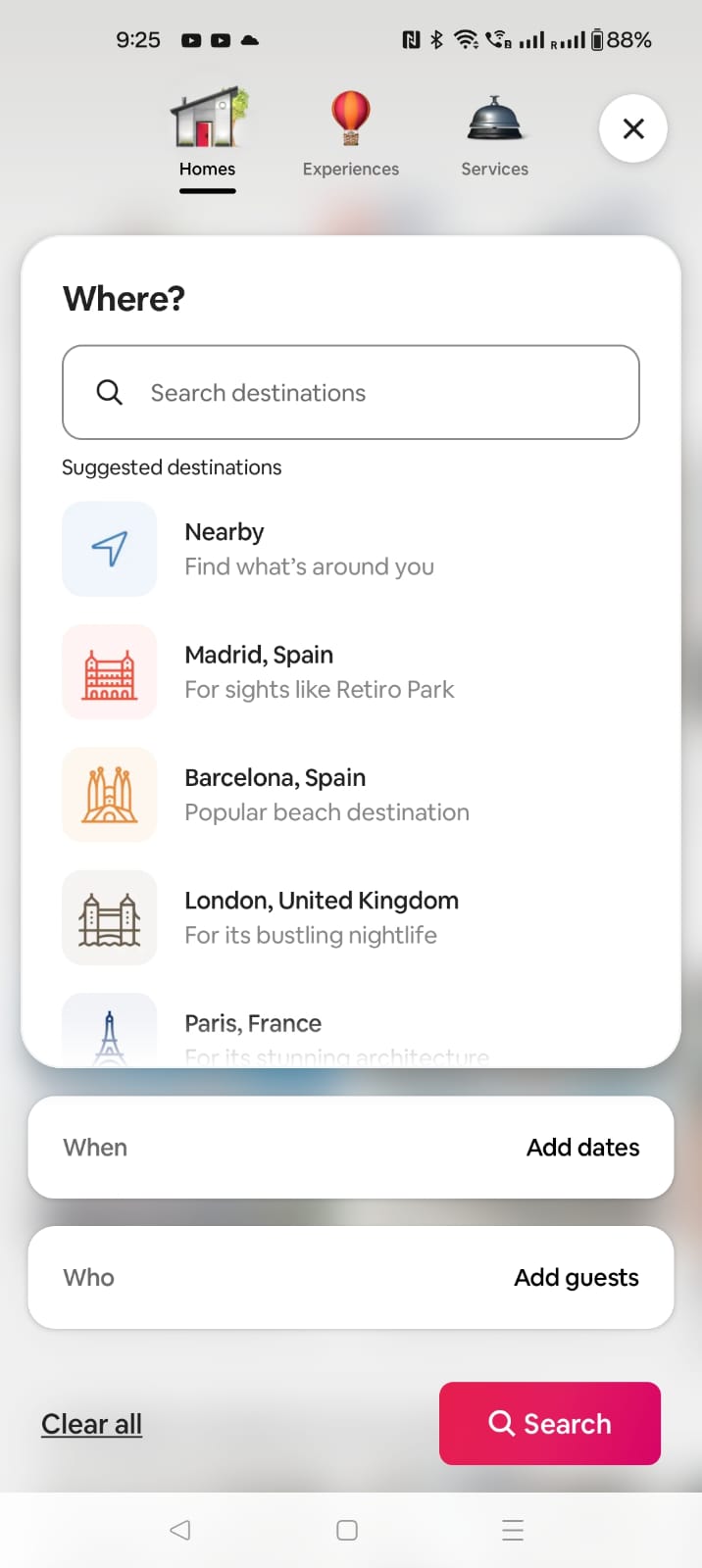
Zomato
Zomato


Heuristic principle:
Recognition Rather Than Recall
Heuristic principle:
Recognition Rather Than Recall
Observation:
Search icon is always visible on the top makes it the first thing user sees, reducing cognitive load and improving efficiency. Research have found users scan a mobile screen on a top-to-bottom basics.
Observation:
Search icon is always visible on the top makes it the first thing user sees, reducing cognitive load and improving efficiency. Research have found users scan a mobile screen on a top-to-bottom basics.
User psychology:
Mental Model Consistency
User psychology:
Mental Model Consistency
Observation:
Users are accustomed to top-aligned search in apps like Netflix, YouTube, Airbnb, Zomato and Amazon. Placing it there matches expectations, reducing learning time and errors.
Observation:
Users are accustomed to top-aligned search in apps like Netflix, YouTube, Airbnb, Zomato and Amazon. Placing it there matches expectations, reducing learning time and errors.
Ideation
Ideation
Thinking of possible solutions…
Thinking of possible solutions…
Home Screen
Home Screen
Idea 1:
Place the search search/icon at the top of the screen like all other platforms.
Idea 1:
Place the search search/icon at the top of the screen like all other platforms.
Idea 2:
Create a search field with the search icon at the top of the screen.
Idea 2:
Create a search field with the search icon at the top of the screen.
Idea 3:
Search icon on the bottom nav bar can be replaced by downloads.
Idea 3:
Search icon on the bottom nav bar can be replaced by downloads.
Search Screen
Search Screen
Idea 1:
Filter icon below the search field so user can choose from the list of options.
Idea 1:
Filter icon below the search field so user can choose from the list of options.
Idea 2:
Show all the categories at the top of recent searches and popular searches to narrow down their searches.
Idea 2:
Show all the categories at the top of recent searches and popular searches to narrow down their searches.

Idea 1:
Add categories to show the search results
Idea 1:
Add categories to show the search results
Idea 2:
Divide search results into two parts
- Top results
- More results
and add categories to more results
Idea 2:
Divide search results into two parts
- Top results
- More results
and add categories to more results
Creating wireframes for visualization
Creating wireframes for visualization
Home Screen
Home Screen

Design decision:
Search field is placed at the top of the home screen for easy access.
Design decision:
Search field is placed at the top of the home screen for easy access.
UX Law implemented:
As discussed in the Fundamental UX Principle of Jacob’s Law, users like to spend more time on other apps and other apps have a search section at the top. Users are habituated with this method.
UX Law implemented:
As discussed in the Fundamental UX Principle of Jacob’s Law, users like to spend more time on other apps and other apps have a search section at the top. Users are habituated with this method.
Accessibility:
The mic icon allows hands-free search, helping users who have difficulty typing and making the experience faster, easier, and more inclusive.
Accessibility:
The mic icon allows hands-free search, helping users who have difficulty typing and making the experience faster, easier, and more inclusive.
Search Screen
Search Screen

Design decision:
Back icon is placed at the top of the search screen to go back to homepage.
Design decision:
Back icon is placed at the top of the search screen to go back to homepage.
UX Law implemented:
As discussed in the Fundamental UX Principle of Law of Similarity, users perceive similar elements as a complete picture, shape or group, even if those elements are separated.
UX Law implemented:
As discussed in the Fundamental UX Principle of Law of Similarity, users perceive similar elements as a complete picture, shape or group, even if those elements are separated.
Design
Design
Designing the Hi-Fi screens
Designing the Hi-Fi screens
Home Screen
Home Screen

Changes made -
Added a search field at the top of the screen.
Replaced the search icon from the nav bar with downloads icon.
Changes made -
Added a search field at the top of the screen.
Replaced the search icon from the nav bar with downloads icon.
How it benefits the user?
Users can now find the search option easily as it is at the top of the screen. No extra time spent in looking for the search option.
Users can see all their downloads in one click.
How it benefits the user?
Users can now find the search option easily as it is at the top of the screen. No extra time spent in looking for the search option.
Users can see all their downloads in one click.
How it benefits the business?
Changing the location of search feature will increase retention.
How it benefits the business?
Changing the location of search feature will increase retention.
Search Screen
Search Screen

Changes made -
Added a back button at the top to go back to homepage.
Added a categories selection tab with values like Movies, TV Sports and More on both recent search section as well as popular search section.
Changes made -
Added a back button at the top to go back to homepage.
Added a categories selection tab with values like Movies, TV Sports and More on both recent search section as well as popular search section.
How it benefits the user?
Back allows the user to get a clear navigation to the previous page similar to Netflix back option.
Category selection gives the user the efficiency to search faster.
How it benefits the user?
Back allows the user to get a clear navigation to the previous page similar to Netflix back option.
Category selection gives the user the efficiency to search faster.
How it benefits the business?
Introducing this feature will reduce the session length of searching and increase retention.
How it benefits the business?
Introducing this feature will reduce the session length of searching and increase retention.
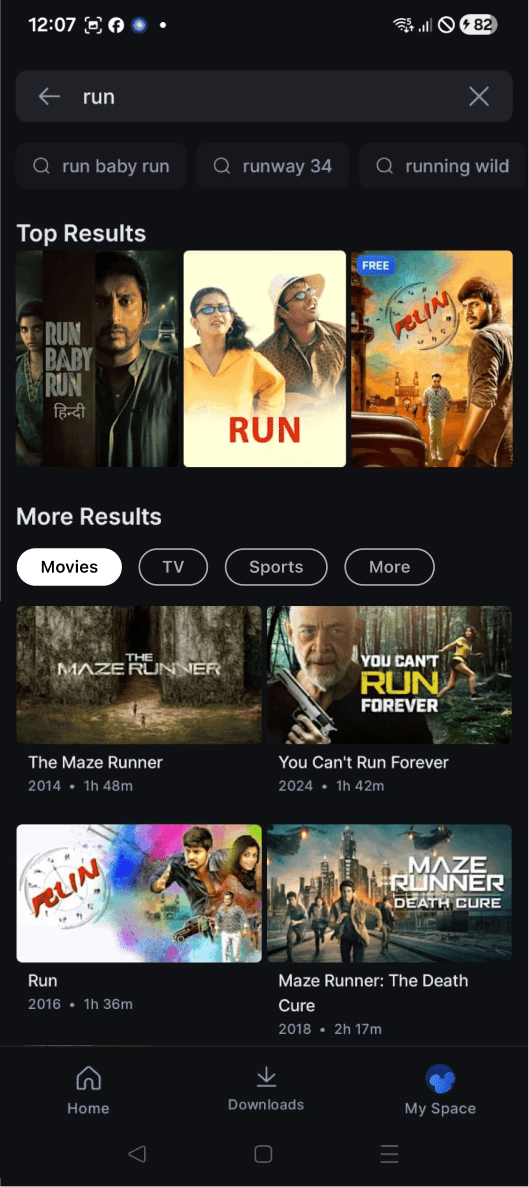
Changes made -
Added Top results separately
Changes made -
Added Top results separately
UX perspective -
Shows most relevant and popular content first, reducing scanning
UX perspective -
Shows most relevant and popular content first, reducing scanning
User psychology
Builds confidence in the user as users trust results that are ranked higher
User psychology
Builds confidence in the user as users trust results that are ranked higher
Changes made -
Divided content into two sections - Top results and More results
Added category wise selection for more results
Changes made -
Divided content into two sections - Top results and More results
Added category wise selection for more results
How it benefits the user?
This allows the user to narrow down their search
How it benefits the user?
This allows the user to narrow down their search
How it benefits the business?
Introducing this feature will increase user retention.
How it benefits the business?
Introducing this feature will increase user retention.
Usability Testing
Usability Testing
Defining the tasks for the users
Defining the tasks for the users
From home screen find the search option to search for a desired movie.
From home screen find the search option to search for a desired movie.
Go to the search page.
Go to the search page.
Search for the movie Run.
Search for the movie Run.
Find a list of popular TV shows using the search experience.
Find a list of popular TV shows using the search experience.
Find out what have you searched for recently.
Find out what have you searched for recently.
Click on one of you recent searches.
Click on one of you recent searches.
Delete one or more items from recent search history.
Delete one or more items from recent search history.
Things to observe
Things to observe
Discoverability
Discoverability
Can users easily find the search button?
Can users easily find the search button?
Is the search entry point obvious?
Is the search entry point obvious?
Does the user notice the voice search (mic) option?
Does the user notice the voice search (mic) option?
Search Effectiveness
Search Effectiveness
Can users find the desired movie/show?
Can users find the desired movie/show?
Are results relevant and well-categorized?
Are results relevant and well-categorized?
Does categorization save time?
Does categorization save time?
Navigation & Clarity
Navigation & Clarity
Do users understand the category labels?
Do users understand the category labels?
Are the category names clear and meaningful?
Are the category names clear and meaningful?
Can they navigate between categories and return to home?
Can they navigate between categories and return to home?
Control & Cognitive Load
Control & Cognitive Load
Can users see and manage recent searches?
Can users see and manage recent searches?
Is the option to delete search history easy to find and understand?
Is the option to delete search history easy to find and understand?
Does the user feel in control or overwhelmed during the search experience?
Does the user feel in control or overwhelmed during the search experience?
Observation notes
Observation notes
User 1
User was able to find the search field.
User was able to find the search field.
User was able to go back to the home screen from search screen
User was able to go back to the home screen from search screen
User was not able to clear all his recent search history in one click.
User was not able to clear all his recent search history in one click.
Able to navigate b/w the categories and find the movie
Able to navigate b/w the categories and find the movie
User found the categorization helpful in finding the desired search
User found the categorization helpful in finding the desired search
Categorization saved time
Categorization saved time
Wanted to see the movie time for the top result’s cards as well
Wanted to see the movie time for the top result’s cards as well
Thought the search field took too much of header space
Thought the search field took too much of header space
User 2
User was able to find the search field.
User was able to find the search field.
Used voice search to move faster
Used voice search to move faster
Used recent searches effectively
Used recent searches effectively
Managed to delete a recent search eventually
Managed to delete a recent search eventually
Understood main categories at first glance
Understood main categories at first glance
Categorization saved time
Categorization saved time
Thought the search field took too much of header space
Thought the search field took too much of header space
Found the categorization on recent search to be unnecessary
Found the categorization on recent search to be unnecessary
Design
Design
Implementing the final UI changes
Implementing the final UI changes
Original screen
Original screen

Redesigned screen
Redesigned screen
Did not work
Redesign after testing (Final UI)
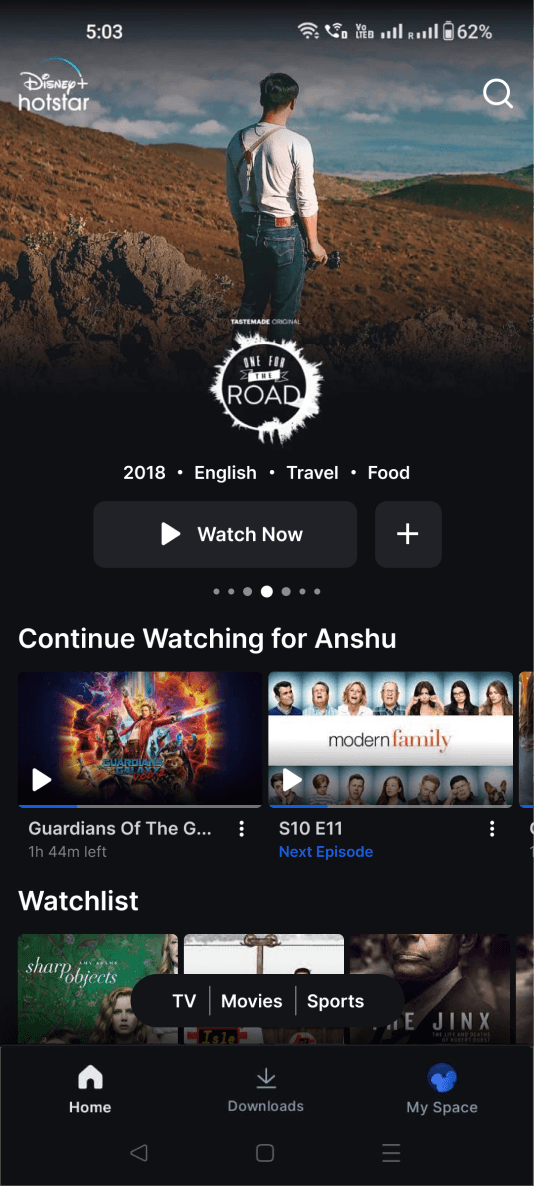
Changes made -
Replaced the search field with just a search icon.
Changes made -
Replaced the search field with just a search icon.
How it benefits the user?
User can now see more of the hero image and also see the search icon.
How it benefits the user?
User can now see more of the hero image and also see the search icon.
How it benefits the business?
Changing the location of this feature will increase retention.
How it benefits the business?
Changing the location of this feature will increase retention.
Original screen
Original screen
Redesigned screen
Redesigned screen
Did not work
Redesign after testing (Final UI)
Redesign after testing (Final UI)

Changes made -
Removed categories from recent search
Added clear all CTA for recent search
Changes made -
Removed categories from recent search
Added clear all CTA for recent search
How it benefits the user?
Users can now know clear all their recent search list in one click making the list clear.
How it benefits the user?
Users can now know clear all their recent search list in one click making the list clear.
How it benefits the business?
Introducing this feature will reduce the session length of searching.
How it benefits the business?
Introducing this feature will reduce the session length of searching.
Original screen
Original screen

Redesigned screen
Redesigned screen
Did not work
Redesign after testing (Final UI)
Redesign after testing (Final UI)
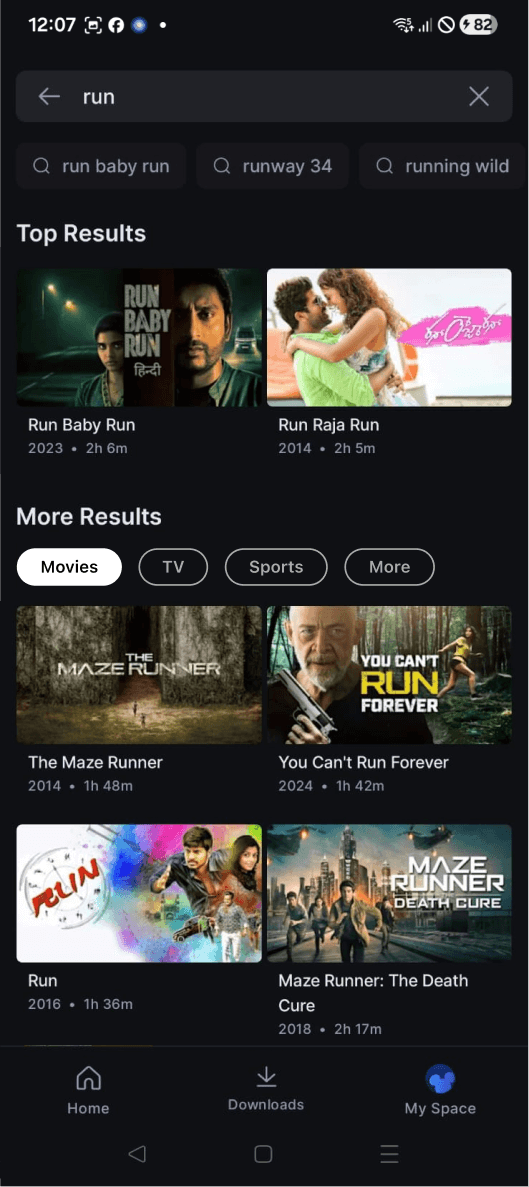
Changes made -
Designed the top results card similar to more results cards
Changes made -
Designed the top results card similar to more results cards
How it benefits the user?
Brings consistency to user’s perception
How it benefits the user?
Brings consistency to user’s perception
How it benefits the business?
Introducing this feature will increase user retention.
How it benefits the business?
Introducing this feature will increase user retention.
My learnings about search UX
My learnings about search UX
1
1
Search is a critical experience, not just a feature
Search is a critical experience, not just a feature
2
2
I learned that clarity, categorization and predictive suggestions are key in features like search.
I learned that clarity, categorization and predictive suggestions are key in features like search.
3
3
Relevance matters more than the number of results
Relevance matters more than the number of results
4
4
Even small improvements in recognition over recall and feedback can make a huge difference in user satisfaction.
Even small improvements in recognition over recall and feedback can make a huge difference in user satisfaction.
5
5
Designing search requires balancing user intent and business goals
Designing search requires balancing user intent and business goals
Redesigning Disney+ Hotstar's search to speed up content discovery
Time:
1 week (2023)
Industry:
Media and Entertainment
Team:
Individual Project
Platform:
Mobile
My role:
UX Designer -> Responsible for heuristic evaluation, research, design and usability testing
Project Overview
This case study focuses on evaluating and improving the search experience of the Disney+ Hotstar mobile app using Jakob Nielsen’s usability heuristics. The goal was to identify usability friction within the search and search history flows that increased cognitive load and prolonged user sessions and to propose design improvements that may help users find content faster and with more confidence.
Scope of the project
The project was focused on-
Search entry, search suggestions, search results and search history experience on mobile app only.
Outcomes
Identified high-impact usability issues, mapped them to heuristic violations, and proposed design solutions that aimed at reducing friction, improving discoverability and supporting faster content discovery.
Why did I pick this app?
The starting point for this project was a simple question I asked myself:
"Why is it easy for me
to find content on Netflix,
but feels overwhelming
on Disney+ Hotstar?"
Despite offering a vast content library, Hotstar often required more effort to search, scan and decide what to watch. This contrast highlighted a potential usability gap and became the trigger for a deeper evaluation of the app’s search experience.
I also chose Disney+ Hotstar app because it’s one of the most widely used OTT platforms in India, with a massive and diverse user base. Its popularity made it an ideal for heuristic evaluation, as I could easily observe a range of user interactions and identify usability patterns at scale. Additionally, choosing a well-known app increased my chances of finding users for testing and interviews, allowing me to gather more relevant insights and validate observations effectively.
My approach

Understanding needs
What is Disney+Hotstar?
Disney+ Hotstar is the streaming home of Disney, Pixar, Marvel, Star Wars, National Geographic, Star and more. It caters to a large and diverse audience, particularly in India, by combining global entertainment from Disney with regional and local content. The platform supports high frequency usage patterns, where users regularly browse, search and discover content which makes usability, navigation and search efficiency critical to the overall experience.
11.9 M
App Review
4.0
Rating
500 M+
Downloads
Before diving, let’s understand “Why search matters”
Search is one of the most frequently used features in streaming apps, especially for repeat users who often arrive with a clear intent to watch something specific.
1
Users search every time to find content quickly.
2
Poor search increases cognitive load, session length and drop-offs.
3
Search efficiency directly affects happy users and business metrics like retention.
Defining the problem statement
Users find it difficult and overwhelming to search for content on Disney+ Hotstar. Search results were unclear and hard to scan, making it frustrating and time consuming to find desired movies, TV shows or sports content.
Heuristic Evaluation
Problems identified through heuristics
I chose Jacob Nielsen's heuristic evaluation method because it’s a quick and practical way to spot usability issues and make the app easier for users.
Home Screen
Heuristic principle:
Flexibility & Efficiency of Use
Problem identified:
Users are habituated with search option to be at the top of the screen. Bottom search icon is hampering the flexibility and efficiency of use of the user. The user has to scan the whole screen from top to bottom to find the search option.
Heuristic principle:
Flexibility & Efficiency of Use
Problem identified:
Users have to click at the bottom icon to open search and then click on top of the screen to type something to search. This makes it difficult for the users to go from bottom to top for searching.
Search Screen
Heuristic principle:
Flexibility & Efficiency of Use
Problem identified:
The user lacks flexibility and efficiency of use because user can’t filter or personalize the search result. Like user may want to see the most recent search based on categories by default. Currently user is forced to see all mixed categories in the most recent manner only.
Heuristic principle:
User Control and Freedom
Problem identified:
There is no clear all option for the user to clear his/her search history.
Heuristic principle:
Recognition Rather Than Recall
Problem identified:
User has to recall about the product category(Movie, TV or Sports) they are searching for. Increasing the memory load.
Observation:
When users search for something, the app shows a long list of results that match the keywords in the title or description. However, there’s no clear way to tell whether a result is a movie, a show, or a sports video. This makes it harder for users to quickly find what they want and can be frustrating.
Observation:
Sometimes, the search results show items that don’t actually match the words the user typed. This confuses users and makes the search feel unreliable, which can be frustrating.
Research
Learning design from existing products
Netflix
Airbnb
Zomato
Heuristic principle:
Recognition Rather Than Recall
Observation:
Search icon is always visible on the top makes it the first thing user sees, reducing cognitive load and improving efficiency. Research have found users scan a mobile screen on a top-to-bottom basics.
User psychology:
Mental Model Consistency
Observation:
Users are accustomed to top-aligned search in apps like Netflix, YouTube, Airbnb, Zomato and Amazon. Placing it there matches expectations, reducing learning time and errors.
Ideation
Thinking of possible solutions…
Home Screen
Idea 1:
Place the search search/icon at the top of the screen like all other platforms.
Idea 2:
Create a search field with the search icon at the top of the screen.
Idea 3:
Search icon on the bottom nav bar can be replaced by downloads.
Search Screen
Idea 1:
Filter icon below the search field so user can choose from the list of options.
Idea 2:
Show all the categories at the top of recent searches and popular searches to narrow down their searches.
Idea 1:
Add categories to show the search results
Idea 2:
Divide search results into two parts
- Top results
- More results
and add categories to more results
Creating wireframes for visualization
Home Screen
Design decision:
Search field is placed at the top of the home screen for easy access.
UX Law implemented:
As discussed in the Fundamental UX Principle of Jacob’s Law, users like to spend more time on other apps and other apps have a search section at the top. Users are habituated with this method.
Accessibility:
The mic icon allows hands-free search, helping users who have difficulty typing and making the experience faster, easier, and more inclusive.
Search Screen
Design decision:
Back icon is placed at the top of the search screen to go back to homepage.
UX Law implemented:
As discussed in the Fundamental UX Principle of Law of Similarity, users perceive similar elements as a complete picture, shape or group, even if those elements are separated.
Design
Designing the Hi-Fi screens
Home Screen
Changes made -
Added a search field at the top of the screen.
Replaced the search icon from the nav bar with downloads icon.
How it benefits the user?
Users can now find the search option easily as it is at the top of the screen. No extra time spent in looking for the search option.
Users can see all their downloads in one click.
How it benefits the business?
Changing the location of search feature will increase retention.
Search Screen
Changes made -
Added a back button at the top to go back to homepage.
Added a categories selection tab with values like Movies, TV Sports and More on both recent search section as well as popular search section.
How it benefits the user?
Back allows the user to get a clear navigation to the previous page similar to Netflix back option.
Category selection gives the user the efficiency to search faster.
How it benefits the business?
Introducing this feature will reduce the session length of searching and increase retention.
Changes made -
Added Top results separately
UX perspective -
Shows most relevant and popular content first, reducing scanning
User psychology
Builds confidence in the user as users trust results that are ranked higher
Changes made -
Divided content into two sections - Top results and More results
Added category wise selection for more results
How it benefits the user?
This allows the user to narrow down their search
How it benefits the business?
Introducing this feature will increase user retention.
Usability Testing
Defining the tasks for the users
From home screen find the search option to search for a desired movie.
Go to the search page.
Search for the movie Run.
Find a list of popular TV shows using the search experience.
Find out what have you searched for recently.
Click on one of you recent searches.
Delete one or more items from recent search history.
Things to observe
Discoverability
Can users easily find the search button?
Is the search entry point obvious?
Does the user notice the voice search (mic) option?
Search Effectiveness
Can users find the desired movie/show?
Are results relevant and well-categorized?
Does categorization save time?
Navigation & Clarity
Do users understand the category labels?
Are the category names clear and meaningful?
Can they navigate between categories and return to home?
Control & Cognitive Load
Can users see and manage recent searches?
Is the option to delete search history easy to find and understand?
Does the user feel in control or overwhelmed during the search experience?
Observation notes
User 1
User was able to find the search field.
User was able to go back to the home screen from search screen
User was not able to clear all his recent search history in one click.
Able to navigate b/w the categories and find the movie
User found the categorization helpful in finding the desired search
Categorization saved time
Wanted to see the movie time for the top result’s cards as well
Thought the search field took too much of header space
User 2
User was able to find the search field.
Used voice search to move faster
Used recent searches effectively
Managed to delete a recent search eventually
Understood main categories at first glance
Categorization saved time
Thought the search field took too much of header space
Found the categorization on recent search to be unnecessary
Design
Implementing the final UI changes
Original screen
Redesigned screen
Did not work
Redesign after testing (Final UI)
Changes made -
Replaced the search field with just a search icon.
How it benefits the user?
User can now see more of the hero image and also see the search icon.
How it benefits the business?
Changing the location of this feature will increase retention.
Original screen
Redesigned screen
Did not work
Redesign after testing (Final UI)
Changes made -
Removed categories from recent search
Added clear all CTA for recent search
How it benefits the user?
Users can now know clear all their recent search list in one click making the list clear.
How it benefits the business?
Introducing this feature will reduce the session length of searching.
Original screen
Redesigned screen
Did not work
Redesign after testing (Final UI)
Changes made -
Designed the top results card similar to more results cards
How it benefits the user?
Brings consistency to user’s perception
How it benefits the business?
Introducing this feature will increase user retention.
My learnings about search UX
1
Search is a critical experience, not just a feature
2
I learned that clarity, categorization and predictive suggestions are key in features like search.
3
Relevance matters more than the number of results
4
Even small improvements in recognition over recall and feedback can make a huge difference in user satisfaction.
5
Designing search requires balancing user intent and business goals